> For the complete documentation index, see [llms.txt](https://docs.butternetwork.io/llms.txt). Markdown versions of documentation pages are available by appending `.md` to page URLs; this page is available as [Markdown](https://docs.butternetwork.io/butter-swap-user-guide/swap-tutorials/swap-btc-to-usdc-solana.md).
# BTC (Native Bitcoin) to USDC on Solana
This guide shows how to swap native BTC on Bitcoin mainnet into USDC on Solana using ButterSwap. If you are looking to convert BTC to USDC on Solana without a centralized exchange account, follow the steps below.
***
## Pre-filled BTC to USDC (Solana) swap link
[Pre-filled BTC to USDC on Solana swap link](https://www.butterswap.io/en/swap?from=1360095883558913%3ABTC\&to=1360108768460801%3AUSDC)
**Note**: This link defaults to USDC on Solana. If you want a different token on Solana (for example SOL or USDT), change the To token before confirming. Keep the To network as Solana.
**Important**: This page is for native BTC on Bitcoin mainnet only. It is not WBTC, BTCB, or BTC on any other chain.
***
## Quick checklist (30 seconds)
✅ BTC on Bitcoin mainnet (native BTC)\
✅ Extra BTC for the Bitcoin network fee (miner fee)\
✅ A Solana receiving address (base58 format, not `0x...`, not `T...`, not `bc1...`)\
✅ Destination is USDC on Solana (not Ethereum USDC, not TRON USDT)
***
## What you will get
You will send native BTC on Bitcoin mainnet and receive USDC on Solana to a Solana address (base58 format).
***
## Before you start
### Solana address format check (do not mix networks)
Your Received Address must be a Solana address (base58). It is usually a long string of letters and numbers.
✅ Solana address format: base58 Solana address\
❌ Not `0x...` (Ethereum, BNB Chain, EVM)\
❌ Not `T...` (TRON)\
❌ Not `bc1...` / `1...` / `3...` (Bitcoin)
### BTC fees are paid on Bitcoin (in BTC)
Bitcoin sends require a miner fee. Keep extra BTC available so your wallet can broadcast the transaction.
### Solana gas note
You usually do not need SOL to receive USDC on Solana. If you plan to move or swap the USDC later on Solana, you will need a small amount of SOL for Solana fees.
For generic wallet connection help, [Click Here](/butter-swap-user-guide/user-guide.md).
***
## Step by step BTC (Native Bitcoin) to USDC (Solana)
### Step 1) Open ButterSwap
Go to the pre-filled swap page (recommended) or open the app:
* Prefilled: [BTC to USDC on Solana](https://www.butterswap.io/en/swap?from=1360095883558913%3ABTC\&to=1360108768460801%3AUSDC)
* App: [dApp](https://www.butterswap.io/en/swap)
You should see:
* From: BTC on Bitcoin
* To: USDC on Solana
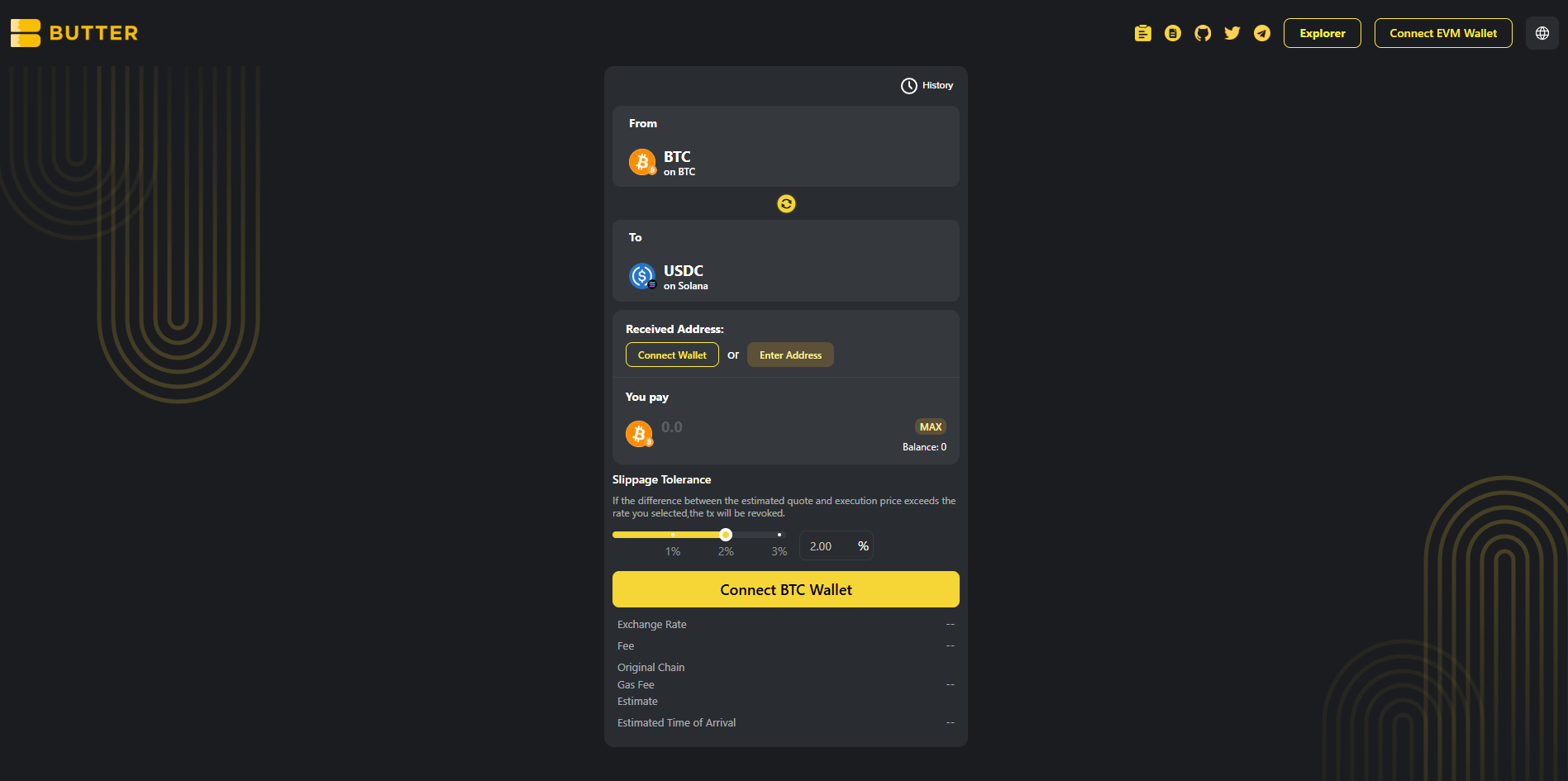 *From BTC (Bitcoin mainnet) to USDC (Solana)*
### Step 2) Connect your BTC wallet first (From)
Click Connect BTC Wallet on the swap card and connect the wallet that holds your native BTC on Bitcoin mainnet.
If your BTC balance shows as 0, confirm you are using a Bitcoin wallet that holds native BTC on Bitcoin mainnet, then reconnect.
*From BTC (Bitcoin mainnet) to USDC (Solana)*
### Step 2) Connect your BTC wallet first (From)
Click Connect BTC Wallet on the swap card and connect the wallet that holds your native BTC on Bitcoin mainnet.
If your BTC balance shows as 0, confirm you are using a Bitcoin wallet that holds native BTC on Bitcoin mainnet, then reconnect.
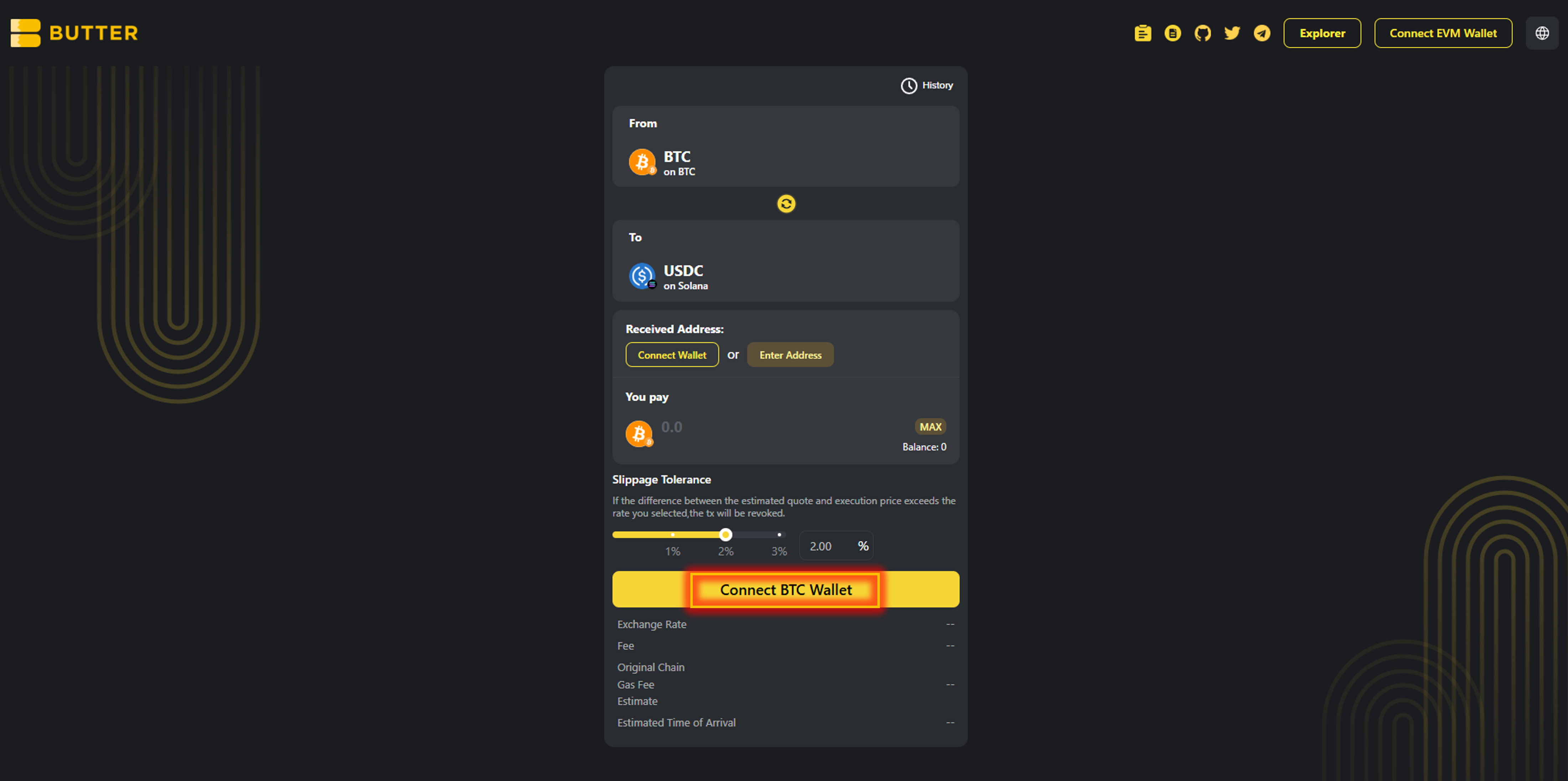 *Connect BTC Wallet for the From side*
### Step 3) Set your Solana receiving address (two valid paths)
In Received Address, you will see two options:
**Option A: Connect wallet (same wallet flow)**\
Click Connect Wallet under Received Address to connect the wallet that will receive USDC on Solana. If it does not provide a Solana address, use Option B.
**Option B: Enter Address (different wallet)**\
Click Enter Address and paste your Solana address (base58 format).
✅ Valid Solana address format: base58 Solana address\
❌ Do not use: `0x...` (EVM), `T...` (TRON), `bc1...` / `1...` / `3...` (Bitcoin)
*Connect BTC Wallet for the From side*
### Step 3) Set your Solana receiving address (two valid paths)
In Received Address, you will see two options:
**Option A: Connect wallet (same wallet flow)**\
Click Connect Wallet under Received Address to connect the wallet that will receive USDC on Solana. If it does not provide a Solana address, use Option B.
**Option B: Enter Address (different wallet)**\
Click Enter Address and paste your Solana address (base58 format).
✅ Valid Solana address format: base58 Solana address\
❌ Do not use: `0x...` (EVM), `T...` (TRON), `bc1...` / `1...` / `3...` (Bitcoin)
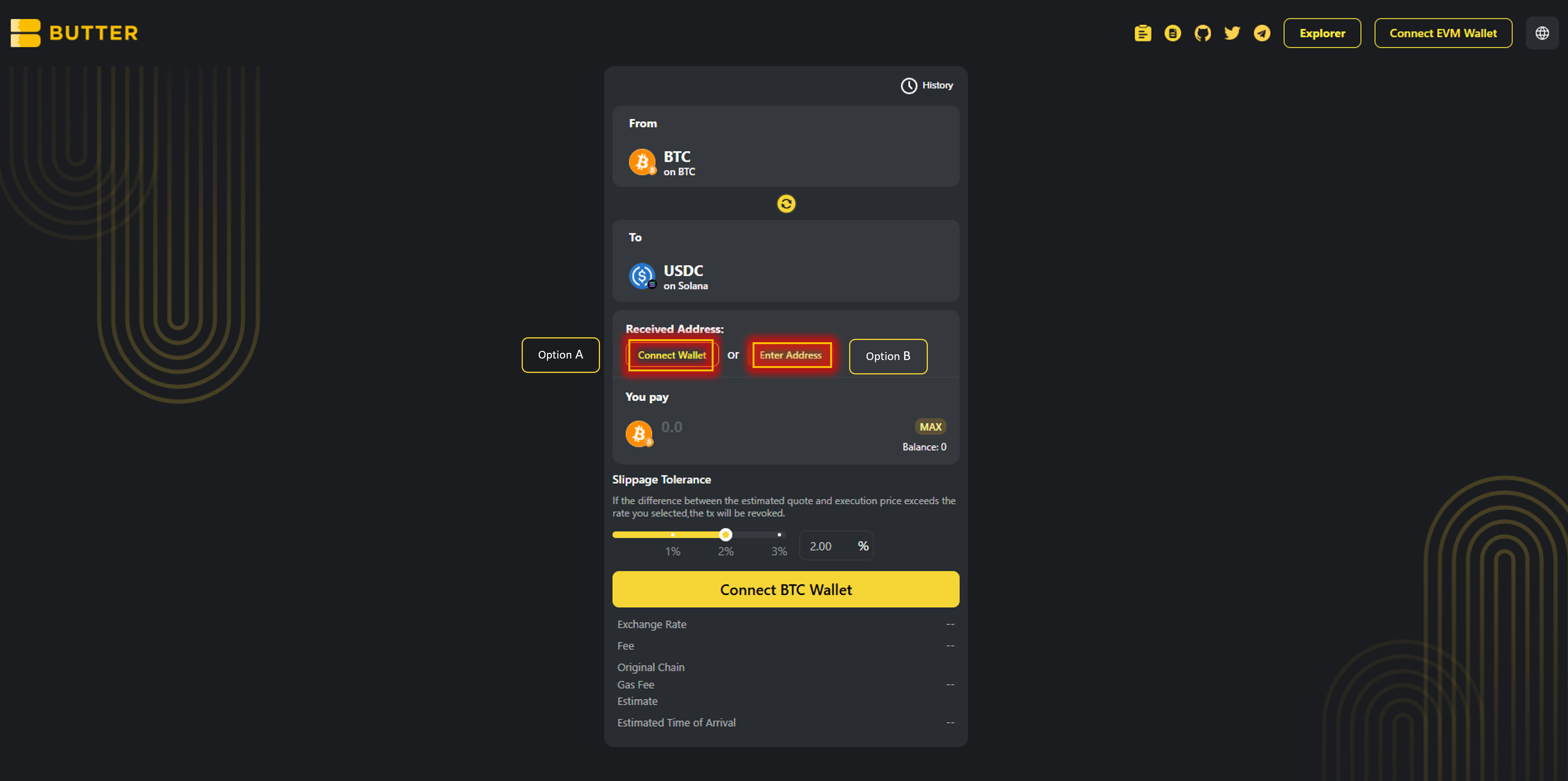 *Received Address options (Connect Wallet or Enter Address)*
### Step 4) Enter amount and review route and fees
Enter the amount of BTC you want to swap.
Review the Best Route panel on the right (route steps and estimated receive). Check the fee and ETA area.
*Received Address options (Connect Wallet or Enter Address)*
### Step 4) Enter amount and review route and fees
Enter the amount of BTC you want to swap.
Review the Best Route panel on the right (route steps and estimated receive). Check the fee and ETA area.
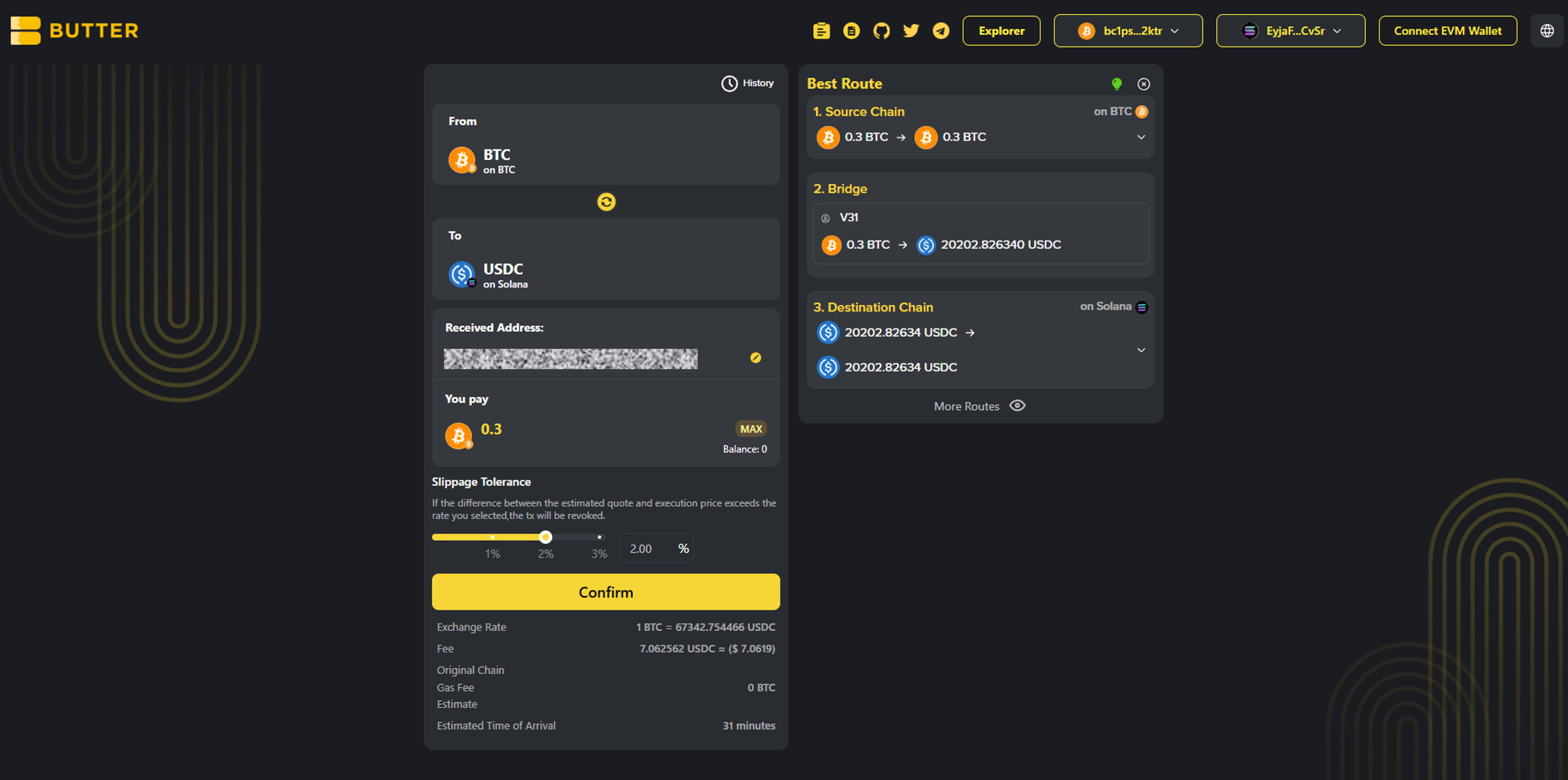 *Best Route and fee or ETA area*
### Step 5) Confirm and complete the flow
Click Confirm to open the swap summary popup. Then follow the exact flow you see in the ButterSwap UI.
* Valid path A: In wallet confirmation\
If your BTC wallet supports in-app signing, you may be asked to approve or sign in your wallet.
* Valid path B: On-screen instructions inside ButterSwap\
If ButterSwap shows BTC send or deposit instructions inside the swap flow, follow the exact instructions shown. Do not send BTC anywhere unless ButterSwap shows it in the swap confirmation flow.
After submitting, you can monitor progress via:
* History in the swap UI (if shown)
* [ButterSwap Explorer](https://explorer.butterswap.io/en) (if linked from the swap details screen)
*Best Route and fee or ETA area*
### Step 5) Confirm and complete the flow
Click Confirm to open the swap summary popup. Then follow the exact flow you see in the ButterSwap UI.
* Valid path A: In wallet confirmation\
If your BTC wallet supports in-app signing, you may be asked to approve or sign in your wallet.
* Valid path B: On-screen instructions inside ButterSwap\
If ButterSwap shows BTC send or deposit instructions inside the swap flow, follow the exact instructions shown. Do not send BTC anywhere unless ButterSwap shows it in the swap confirmation flow.
After submitting, you can monitor progress via:
* History in the swap UI (if shown)
* [ButterSwap Explorer](https://explorer.butterswap.io/en) (if linked from the swap details screen)
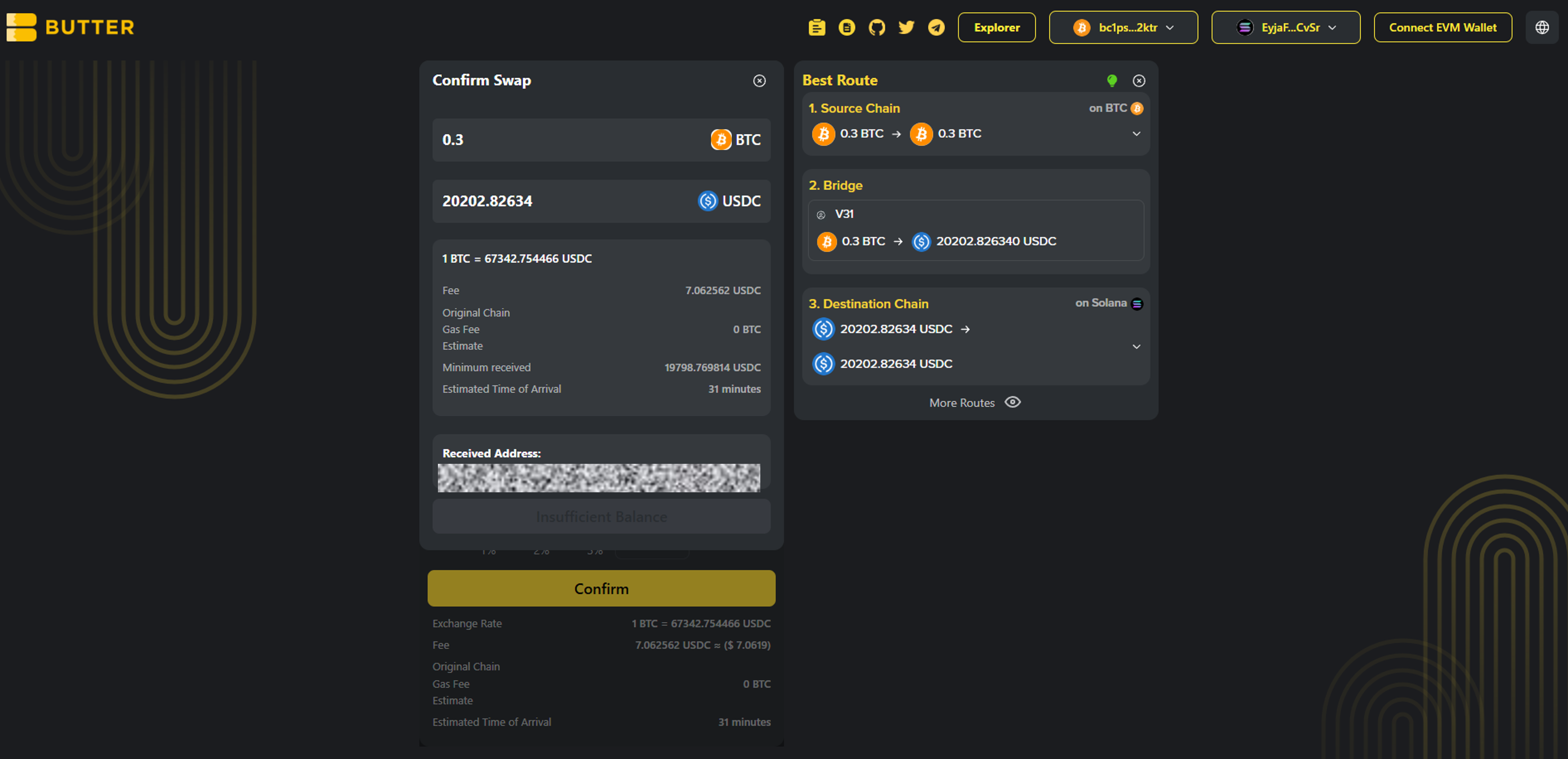 *Confirm swap popup*
***
## Fees and timing
* ### What fees apply?
Bitcoin network fee (miner fee) applies when sending BTC. Route fees, if any, are shown in Best Route and in the confirm summary before you proceed.
* ### Do I need SOL?
Receiving USDC on Solana usually does not require SOL. If you plan to move the USDC later, you will need a small amount of SOL for Solana fees.
* ### How long does it take?
Timing varies based on Bitcoin confirmations and routing execution. Track progress in History and verify via [ButterSwap Explorer](https://explorer.butterswap.io/en) if available.
***
## Common issues (quick fixes)
* ### Wrong receiving address format
Solana receiving addresses are not `0x...`, not `T...`, and not Bitcoin address formats. Paste a valid Solana base58 address.
* ### Not enough BTC to cover miner fee
If your BTC send fails or you cannot proceed, reduce the BTC amount slightly and retry.
* ### Confirm is disabled or the popup does not appear
Most common causes:
1. From wallet not connected (Step 2)
2. Received Address not set (Step 4)
3. Not enough BTC left for the miner fee
4. Amount too small for the route or fees shown
* ### I expected a different token on Solana
This pre-filled link defaults to USDC on Solana. Change the To token before confirming if you want SOL or another Solana token.
***
## FAQ
*Confirm swap popup*
***
## Fees and timing
* ### What fees apply?
Bitcoin network fee (miner fee) applies when sending BTC. Route fees, if any, are shown in Best Route and in the confirm summary before you proceed.
* ### Do I need SOL?
Receiving USDC on Solana usually does not require SOL. If you plan to move the USDC later, you will need a small amount of SOL for Solana fees.
* ### How long does it take?
Timing varies based on Bitcoin confirmations and routing execution. Track progress in History and verify via [ButterSwap Explorer](https://explorer.butterswap.io/en) if available.
***
## Common issues (quick fixes)
* ### Wrong receiving address format
Solana receiving addresses are not `0x...`, not `T...`, and not Bitcoin address formats. Paste a valid Solana base58 address.
* ### Not enough BTC to cover miner fee
If your BTC send fails or you cannot proceed, reduce the BTC amount slightly and retry.
* ### Confirm is disabled or the popup does not appear
Most common causes:
1. From wallet not connected (Step 2)
2. Received Address not set (Step 4)
3. Not enough BTC left for the miner fee
4. Amount too small for the route or fees shown
* ### I expected a different token on Solana
This pre-filled link defaults to USDC on Solana. Change the To token before confirming if you want SOL or another Solana token.
***
## FAQ
How do I swap BTC to USDC on Solana without using a centralized exchange?
**Answer:** Open the pre-filled page:
* [BTC to USDC on Solana](https://www.butterswap.io/en/swap?from=1360095883558913%3ABTC\&to=1360108768460801%3AUSDC)
Then connect your BTC From wallet first, set a Solana Received Address, enter the BTC amount, then Confirm and follow the UI to complete the swap.
What address format do I use to receive USDC on Solana?
Use your Solana wallet address (base58 format). It does not start with 0x, T, or bc1.
Do I need SOL to receive USDC on Solana?
Usually no for receiving. You will need SOL for Solana fees if you move the USDC later.
Is this native BTC on Bitcoin mainnet (not WBTC or BTCB)?
Yes. This guide is for native BTC on Bitcoin mainnet only.
How long does a BTC to Solana USDC swap take?
It varies mainly with Bitcoin confirmations and route execution. Use History and the explorer link from swap details if available.
Can I send BTC directly to a Solana address to convert it?
No. BTC and Solana are different networks. You need a cross-chain swap route to receive USDC on Solana.
How do I swap BTC to SOL on Solana instead of USDC?
Keep the To network as Solana, then change the To token to SOL before you confirm.
***
## Start your BTC to Solana USDC swap
Open the pre-filled page:
* [BTC to USDC on Solana](https://www.butterswap.io/en/swap?from=1360095883558913%3ABTC\&to=1360108768460801%3AUSDC)
Or open the [dApp](https://www.butterswap.io/en/swap) and set:
* From: BTC (Bitcoin mainnet)
* To: USDC on Solana
* Received Address: your Solana address (base58 format)
***
## Related guides
* [USDT (TRC20) to BTC (Native Bitcoin) Step by Step](/butter-swap-user-guide/swap-tutorials/swap-usdt-trc20-to-btc.md)
* [BTC (Native Bitcoin) to USDT on BNB Chain Step by Step](/butter-swap-user-guide/swap-tutorials/swap-btc-to-usdt-bnb-chain.md)
* [BTC (Native Bitcoin) to USDT (TRC20) on TRON Step by Step](/butter-swap-user-guide/swap-tutorials/swap-btc-to-usdt-trc20-tron.md)
* [ETH (Ethereum) to USDT (TRC20) on TRON Step by Step](/butter-swap-user-guide/swap-tutorials/swap-eth-to-usdt-trc20-tron.md)