> For the complete documentation index, see [llms.txt](https://docs.butternetwork.io/llms.txt). Markdown versions of documentation pages are available by appending `.md` to page URLs; this page is available as [Markdown](https://docs.butternetwork.io/butter-swap-user-guide/swap-tutorials/swap-eth-to-usdt-trc20-tron.md).
# ETH (Ethereum) to USDT (TRC20) on TRON
This guide shows how to swap ETH on Ethereum mainnet into USDT (TRC20) on TRON using ButterSwap. If you are looking to convert ETH to TRON USDT (TRC20) without a centralized exchange account, follow the steps below.
***
## Pre-filled ETH to USDT (TRC20) on TRON swap link
[Pre-filled ETH to USDT (TRC20) on TRON swap link](https://www.butterswap.io/en/swap?referrer=\&to=728126428%3AUSDT\&from=1%3AETH)
Note: This link defaults to ETH (Ethereum) to USDT on TRON (TRC20). If you want to swap from a different token on Ethereum (for example USDT ERC20) or swap to a different token on TRON (for example TRX), use the From and To token selectors on the swap page before confirming.
If you want TRX instead of USDT (TRC20), keep the To network as TRON and change the To token to TRX before you confirm.
***
## Quick checklist (30 seconds)
✅ ETH on Ethereum mainnet (for the swap amount)\
✅ Extra ETH for Ethereum gas (network fee)\
✅ A TRON receiving address for TRC20 (usually starts with `T...`)\
✅ You selected USDT on TRON (TRC20) as the destination (not ERC20 or BEP20)
***
## What you will get
You will send ETH on Ethereum mainnet and receive USDT (TRC20) on TRON to your TRON address (`T...`).
***
## Before you start
### TRON address format check (most common mistake)
Your Received Address must be a TRON address for USDT (TRC20):
✅ `T...` (TRON address for TRC20)\
❌ `0x...` (Ethereum, BNB Chain, EVM)\
❌ `bc1...` / `1...` / `3...` (Bitcoin)
If you are using an exchange deposit address, make sure you selected TRC20 as the deposit network on the exchange side.
### Ethereum gas is paid in ETH
Even though you are swapping ETH, you still need extra ETH to pay the Ethereum network fee. If you try to swap max and leave no room for gas, the transaction may fail.
### Wording note: ETH and TRC20
ETH is native on Ethereum (not an ERC20 token). USDT (TRC20) is the TRON version of USDT.
For generic wallet connection help, [Click Here](/butter-swap-user-guide/user-guide.md).
***
## Step by step ETH (Ethereum) to USDT (TRC20) on TRON
### Step 1) Open ButterSwap
Go to the pre-filled swap page (recommended) or open the app:
* Prefilled: [ETH to USDT (TRC20) on TRON](https://www.butterswap.io/en/swap?referrer=\&to=728126428%3AUSDT\&from=1%3AETH)
* App: [dApp](https://www.butterswap.io/en/swap)
You should see:
* From: ETH on Ethereum
* To: USDT on TRON
Now connect the From wallet first:
* Click Connect Ethereum Wallet on the swap card, or use the top right Connect EVM Wallet button, then connect the wallet that holds your ETH on Ethereum mainnet.
If your ETH balance shows as 0, check your wallet network is set to Ethereum mainnet, then reconnect.
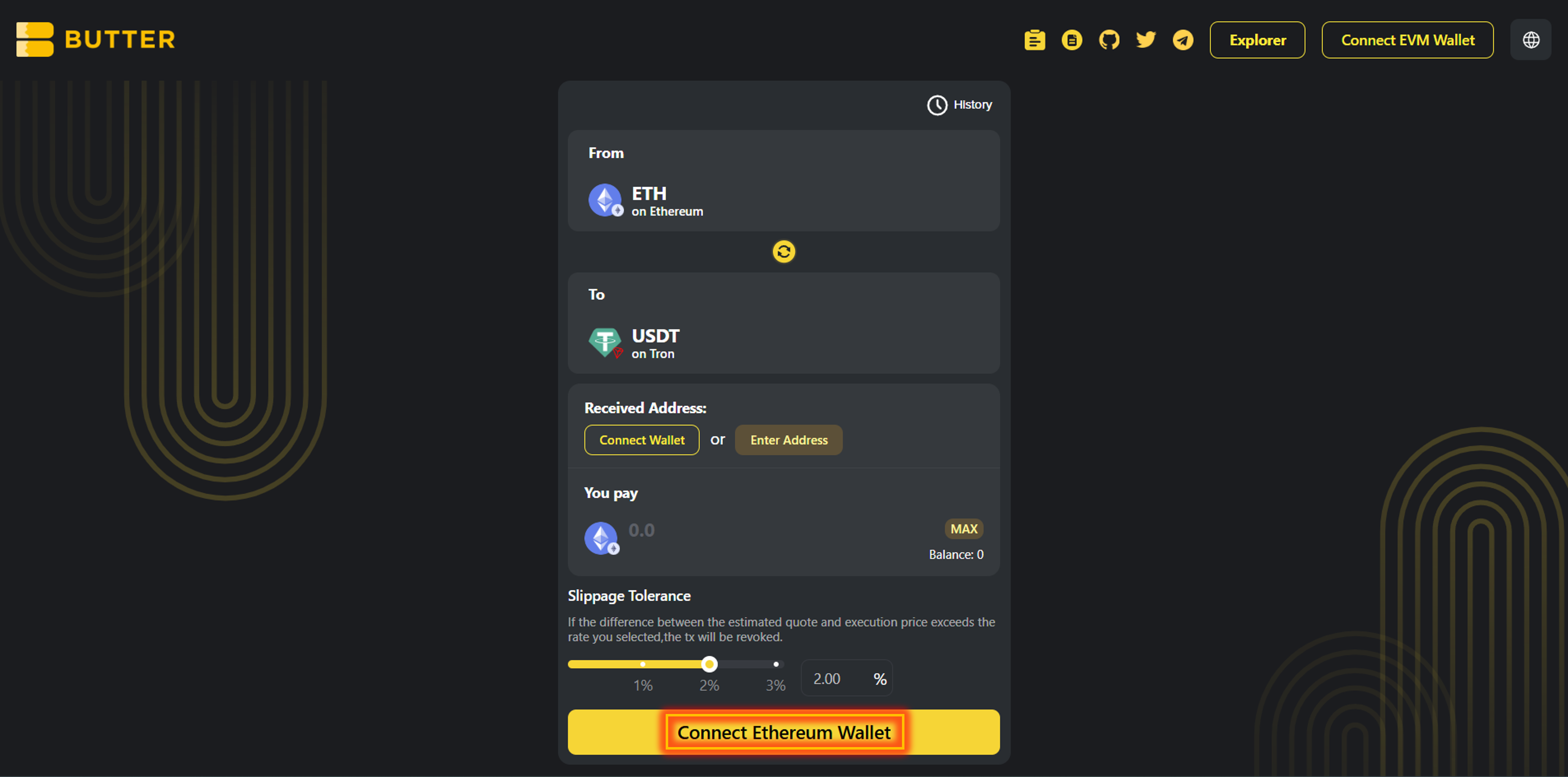 *From ETH (Ethereum) to USDT (TRON TRC20)*
### Step 2) Set your TRON receiving address (two valid paths)
After your Ethereum wallet is connected, set Received Address:
**Option A: Connect wallet (same wallet flow)**\
Click Connect Wallet under Received Address to connect the wallet that will receive USDT (TRC20) on TRON.
**Option B: Enter Address (different wallet)**\
Click Enter Address and paste your TRON address (`T...`).
✅ Valid TRON address format: `T...`\
❌ Do not use: `0x...` (EVM), `bc1...` / `1...` / `3...` (Bitcoin)
*From ETH (Ethereum) to USDT (TRON TRC20)*
### Step 2) Set your TRON receiving address (two valid paths)
After your Ethereum wallet is connected, set Received Address:
**Option A: Connect wallet (same wallet flow)**\
Click Connect Wallet under Received Address to connect the wallet that will receive USDT (TRC20) on TRON.
**Option B: Enter Address (different wallet)**\
Click Enter Address and paste your TRON address (`T...`).
✅ Valid TRON address format: `T...`\
❌ Do not use: `0x...` (EVM), `bc1...` / `1...` / `3...` (Bitcoin)
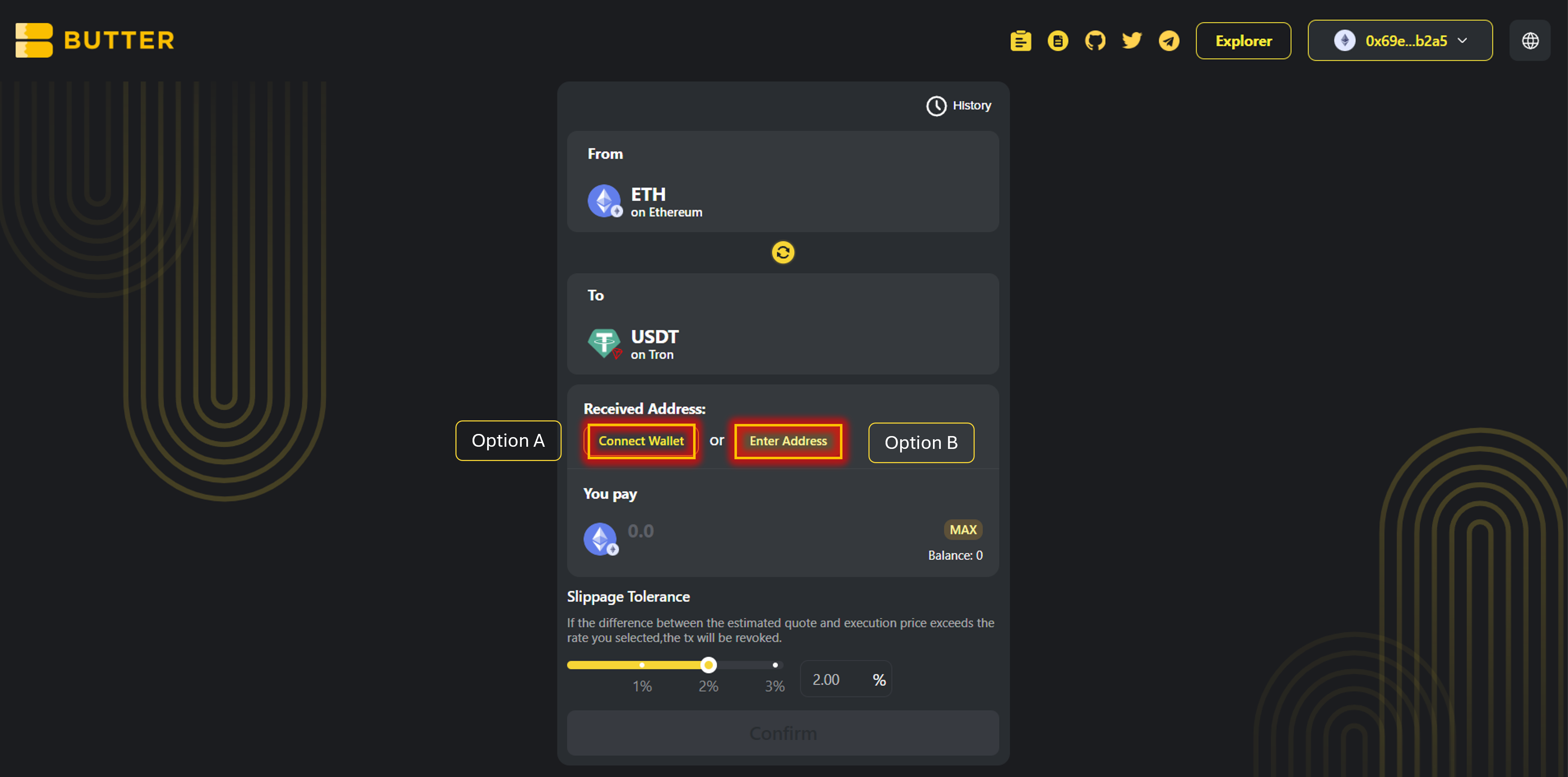 *Received Address options (Connect Wallet or Enter Address)*
### Step 3) Enter amount and review route and fees
Enter the amount of ETH you want to swap.
Review the Best Route panel (route steps and estimated receive). Check the fee and ETA area.
*Received Address options (Connect Wallet or Enter Address)*
### Step 3) Enter amount and review route and fees
Enter the amount of ETH you want to swap.
Review the Best Route panel (route steps and estimated receive). Check the fee and ETA area.
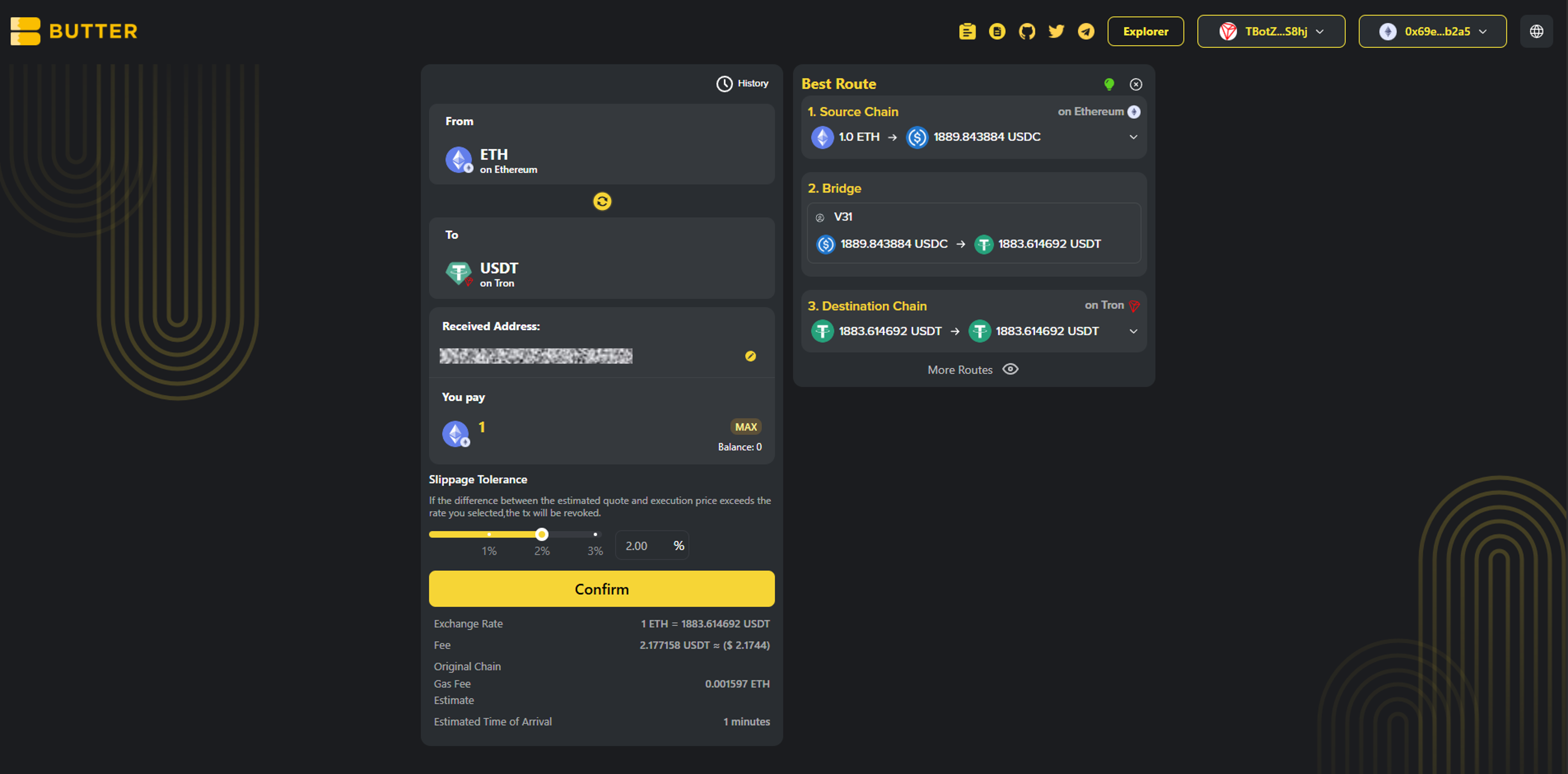 *Best Route and fee or ETA area*
### Step 4) Confirm and complete the flow
Click Confirm to open the swap summary popup. Confirm the details, then follow your wallet prompts to sign and submit.
Before you sign, double-check in the popup:
* To network: TRON
* To token: USDT (TRC20)
* Received Address: your intended `T...` address
*Best Route and fee or ETA area*
### Step 4) Confirm and complete the flow
Click Confirm to open the swap summary popup. Confirm the details, then follow your wallet prompts to sign and submit.
Before you sign, double-check in the popup:
* To network: TRON
* To token: USDT (TRC20)
* Received Address: your intended `T...` address
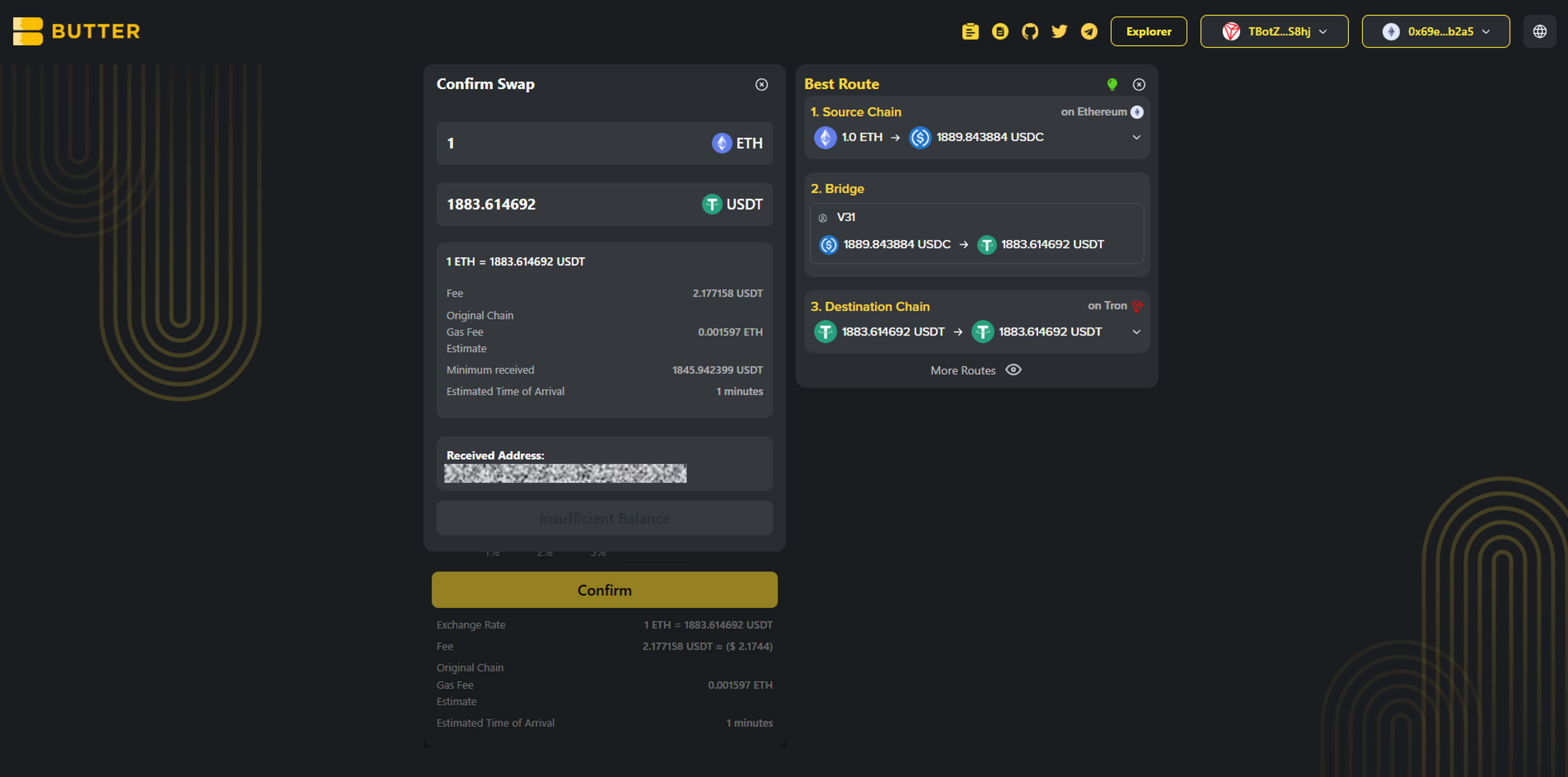 *Confirm swap popup*
***
## Fees and timing
* ### Ethereum network fee (gas)
Paid in ETH on Ethereum mainnet. Keep extra ETH available for gas.
* ### Route and swap fees
Shown in the route and in the confirm summary before you approve.
* ### How long does it take?
Timing depends on Ethereum network conditions and routing execution. Track progress in History and verify via [ButterSwap Explorer](https://explorer.butterswap.io/en) if available.
***
## Common issues (quick fixes)
* ### I pasted a 0x address and it will not work
That is an EVM address, not TRON. For USDT (TRC20), your receiving address must start with `T...`.
* ### My ETH balance shows 0 after connecting
You are likely on the wrong network or account. Switch your wallet to Ethereum mainnet, then reconnect.
* ### Confirm is disabled or the popup does not appear
Most common causes:
1. From wallet not connected (Step 1)
2. Received Address not set (Step 2)
3. Not enough ETH left for gas
4. Amount too small for the route or fees shown
* ### I expected USDT on Ethereum but I received USDT (TRC20)
This guide swaps to TRON USDT (TRC20). If you want USDT on Ethereum (ERC20), change the To network and token before confirming.
* ### I used an exchange TRON deposit address but funds are not credited
Double-check the exchange deposit network is TRC20. Then track status in History or use the explorer link from the swap details screen if available.
***
## FAQ
*Confirm swap popup*
***
## Fees and timing
* ### Ethereum network fee (gas)
Paid in ETH on Ethereum mainnet. Keep extra ETH available for gas.
* ### Route and swap fees
Shown in the route and in the confirm summary before you approve.
* ### How long does it take?
Timing depends on Ethereum network conditions and routing execution. Track progress in History and verify via [ButterSwap Explorer](https://explorer.butterswap.io/en) if available.
***
## Common issues (quick fixes)
* ### I pasted a 0x address and it will not work
That is an EVM address, not TRON. For USDT (TRC20), your receiving address must start with `T...`.
* ### My ETH balance shows 0 after connecting
You are likely on the wrong network or account. Switch your wallet to Ethereum mainnet, then reconnect.
* ### Confirm is disabled or the popup does not appear
Most common causes:
1. From wallet not connected (Step 1)
2. Received Address not set (Step 2)
3. Not enough ETH left for gas
4. Amount too small for the route or fees shown
* ### I expected USDT on Ethereum but I received USDT (TRC20)
This guide swaps to TRON USDT (TRC20). If you want USDT on Ethereum (ERC20), change the To network and token before confirming.
* ### I used an exchange TRON deposit address but funds are not credited
Double-check the exchange deposit network is TRC20. Then track status in History or use the explorer link from the swap details screen if available.
***
## FAQ
How do I swap ETH to USDT (TRC20) on TRON?
Open the pre-filled link, connect your Ethereum From wallet first, set a TRON Received Address (T...), enter the ETH amount, then Confirm and sign.
Can I convert ETH to TRON USDT (TRC20) without a centralized exchange?
Yes. ButterSwap supports a wallet based cross-chain swap flow, no CEX account required.
What address format do I use to receive USDT (TRC20)?
Use a TRON address starting with T. Do not use 0x or Bitcoin address formats.
Do I need TRX to receive USDT (TRC20)?
Receiving usually does not require TRX, but you will need TRX for TRON fees if you plan to move the USDT later.
Why do I need extra ETH if I am swapping ETH?
Ethereum transactions require gas fees paid in ETH, separate from the swap amount.
Is swap ETH to TRC20 the same as bridge ETH to TRON USDT?
Most users mean the same end result, getting value from Ethereum onto TRON as USDT (TRC20). ButterSwap focuses on the swap outcome.
Can I change the destination to TRX instead of USDT?
Yes. Change the To token and select TRX on TRON before confirming.
How do I swap ETH to TRX on TRON instead of USDT (TRC20)?
Use the same flow in this guide. Keep the To network as TRON, then change the To token to TRX before you confirm.
***
## Start your ETH to TRON USDT (TRC20) swap
Open the pre-filled page:
* [ETH to USDT (TRC20) on TRON](https://www.butterswap.io/en/swap?referrer=\&to=728126428%3AUSDT\&from=1%3AETH)
Or open the [dApp](https://www.butterswap.io/en/swap) and set:
* From: ETH (Ethereum)
* To: USDT on TRON (TRC20)
***
## Related guides
* [BTC (Native Bitcoin) to USDT on BNB Chain Step by Step](/butter-swap-user-guide/swap-tutorials/swap-btc-to-usdt-bnb-chain.md)
* [USDT (TRC20) to BTC (Native Bitcoin) Step by Step](/butter-swap-user-guide/swap-tutorials/swap-usdt-trc20-to-btc.md)