> For the complete documentation index, see [llms.txt](https://docs.butternetwork.io/llms.txt). Markdown versions of documentation pages are available by appending `.md` to page URLs; this page is available as [Markdown](https://docs.butternetwork.io/butter-swap-user-guide/swap-tutorials/swap-into-memecoins-safely.md).
# Swap into memecoins safely (Solana, BNB Chain, TRON)
This guide shows how to swap into memecoins on Solana, BNB Chain, and TRON using ButterSwap without a centralized exchange account. It focuses on safe setup, correct receiving address formats, gas requirements, and quick checks to reduce common memecoin mistakes.
***
## Pre-filled swap link
This guide is multi-chain, so there is no single pre-filled pair. Start from the dApp and choose your destination chain and memecoin in the To selector.
[dApp](https://www.butterswap.io/en/swap)
***
## Quick checklist (30 seconds)
✅ Know which destination chain you want: Solana, BNB Chain, or TRON
✅ Have gas on the From chain to sign and submit the swap
✅ Prepare the correct destination receiving address format:
* Solana: base58 Solana address (no `0x...`, no `T...`, no `bc1...`)
* BNB Chain: EVM address (`0x...`)
* TRON: TRON address (`T...`)
✅ Verify the token name and network before you confirm (memecoins often have copycats)
✅ Start small if it is a new memecoin or thin liquidity token
***
## What you will get
You will send a token from your From wallet and receive the selected memecoin on Solana, BNB Chain, or TRON to the receiving address you provide.
***
## Before you start
### 1) Address format check (most common mistake)
Make sure your Received Address matches the destination chain:
✅ Solana: base58 Solana address (example style: `7f...`, `9x...`, `Dk...`)\
✅ BNB Chain: `0x...`\
✅ TRON: `T...`
❌ Do not paste `0x...` for Solana or TRON\
❌ Do not paste `T...` for Solana or BNB Chain\
❌ Do not paste Bitcoin addresses (`bc1...`, `1...`, `3...`) for any of these destinations
### 2) Gas requirements (so the swap does not fail)
* You need gas on the From chain to submit the swap.
* Receiving usually does not require gas, but moving the memecoin later does.
Typical destination gas needs later:
* Solana: small amount of SOL
* BNB Chain: small amount of BNB
* TRON: small amount of TRX (bandwidth/energy)
### 3) Popular memecoins users swap into (examples only)
Examples only, not recommendations. Always verify the destination chain label and token identity in the To selector before confirming.
Top meme coins by market cap:
* DOGE, SHIB, PEPE, FLOKI, BABYDOGE
Solana meme examples:
* BONK, WIF, POPCAT
TRON meme examples:
* SUNDOG, PUSS, TRON BULL
BNB memes (Four.meme ecosystem examples):
* Siren, Conscious Token, BinanceLife
### 4) Memecoin safety basics
Memecoins are high risk and copycats are common. Before swapping:
* Verify the correct token network (Solana vs BNB Chain vs TRON).
* Use official sources for token info (project socials, CoinGecko, or well-known explorers).
* Start with a small test amount if you are unsure.
* If the UI shows a warning, read it and do not ignore it.
For generic wallet connection help, [Click Here](/butter-swap-user-guide/user-guide.md).
***
## Step by step swap into memecoins safely (Solana, BNB Chain, TRON)
### Step 1) Open ButterSwap
Open the app:
* App: [dApp](https://www.butterswap.io/en/swap)
You should see From and To selectors, Received Address, You pay, Slippage Tolerance, Best Route, and Confirm.
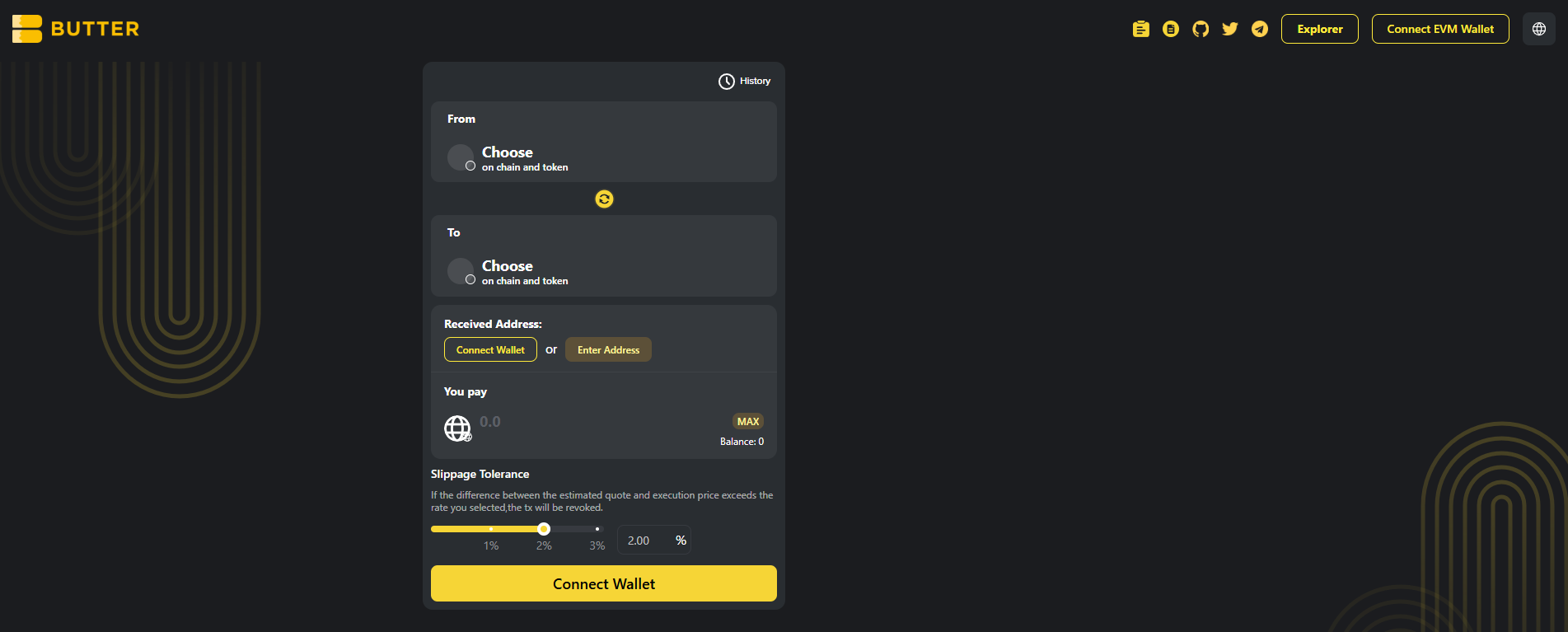 *Main screen showing From, To, Received Address, Slippage Tolerance, and Best Route*
### Step 2) Connect your From wallet first
Connect the wallet that holds the asset you are swapping from.
Common patterns you may see:
* If your From chain is EVM, connect via the top right Connect EVM Wallet button or the swap card button (example: Connect Ethereum Wallet).
* If your From chain is BTC or TRON, use the chain-specific Connect button shown on the swap card.
If your balance shows as 0, check you are on the correct wallet and correct network, then reconnect.
### Step 3) Choose destination chain and memecoin (To)
In the To selector:
1. Select the destination chain you want (Solana, BNB Chain, or TRON)
2. Search for the memecoin by name or ticker
*Main screen showing From, To, Received Address, Slippage Tolerance, and Best Route*
### Step 2) Connect your From wallet first
Connect the wallet that holds the asset you are swapping from.
Common patterns you may see:
* If your From chain is EVM, connect via the top right Connect EVM Wallet button or the swap card button (example: Connect Ethereum Wallet).
* If your From chain is BTC or TRON, use the chain-specific Connect button shown on the swap card.
If your balance shows as 0, check you are on the correct wallet and correct network, then reconnect.
### Step 3) Choose destination chain and memecoin (To)
In the To selector:
1. Select the destination chain you want (Solana, BNB Chain, or TRON)
2. Search for the memecoin by name or ticker
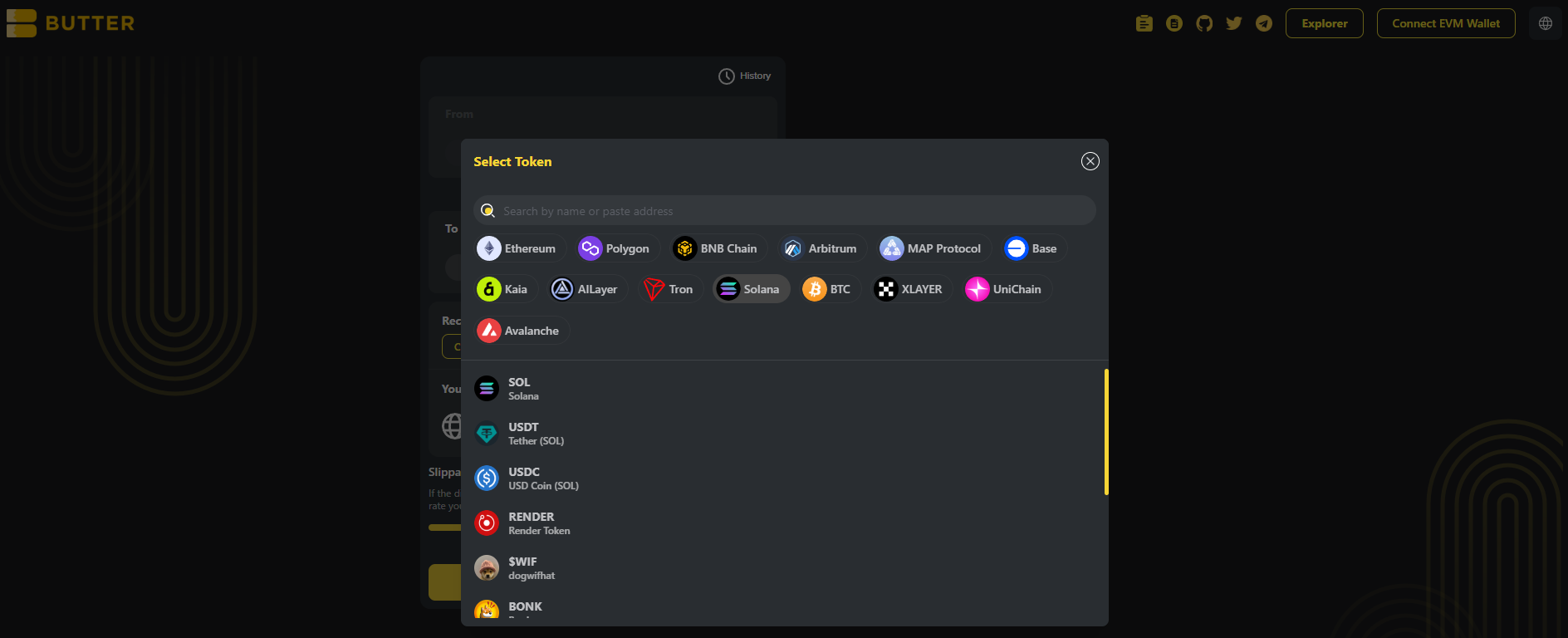 *To selector showing chain selection and token search*
### Step 4) Set your receiving address (two valid paths)
In Received Address, choose one:
**Option A: Connect wallet (same wallet flow)**\
Click Connect Wallet under Received Address and connect your destination wallet.
**Option B: Enter Address (different wallet)**\
Click Enter Address and paste the correct receiving address for the destination chain.
Address format reminders:
* Solana: base58 Solana address (no `0x`, no `T`)
* BNB Chain: `0x...`
* TRON: `T...`
*To selector showing chain selection and token search*
### Step 4) Set your receiving address (two valid paths)
In Received Address, choose one:
**Option A: Connect wallet (same wallet flow)**\
Click Connect Wallet under Received Address and connect your destination wallet.
**Option B: Enter Address (different wallet)**\
Click Enter Address and paste the correct receiving address for the destination chain.
Address format reminders:
* Solana: base58 Solana address (no `0x`, no `T`)
* BNB Chain: `0x...`
* TRON: `T...`
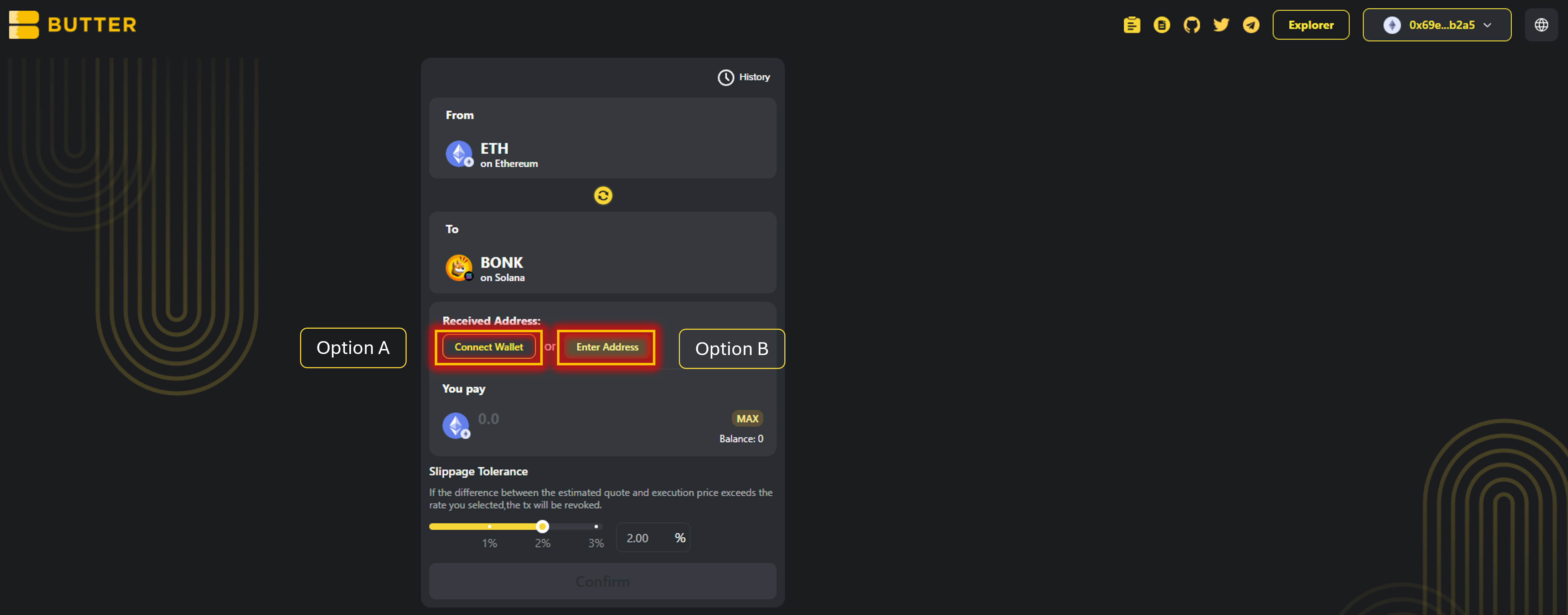 *Received Address options (Connect Wallet or Enter Address)*
### Step 5) Enter amount, set Slippage Tolerance, and review Best Route
Enter the amount you want to swap in **You pay**.
Then set **Slippage Tolerance**.
Now review **Best Route**.
Also review the summary area (where shown):
* Exchange rate
* Fee
* Gas fee estimate
* Estimated time of arrival
*Received Address options (Connect Wallet or Enter Address)*
### Step 5) Enter amount, set Slippage Tolerance, and review Best Route
Enter the amount you want to swap in **You pay**.
Then set **Slippage Tolerance**.
Now review **Best Route**.
Also review the summary area (where shown):
* Exchange rate
* Fee
* Gas fee estimate
* Estimated time of arrival
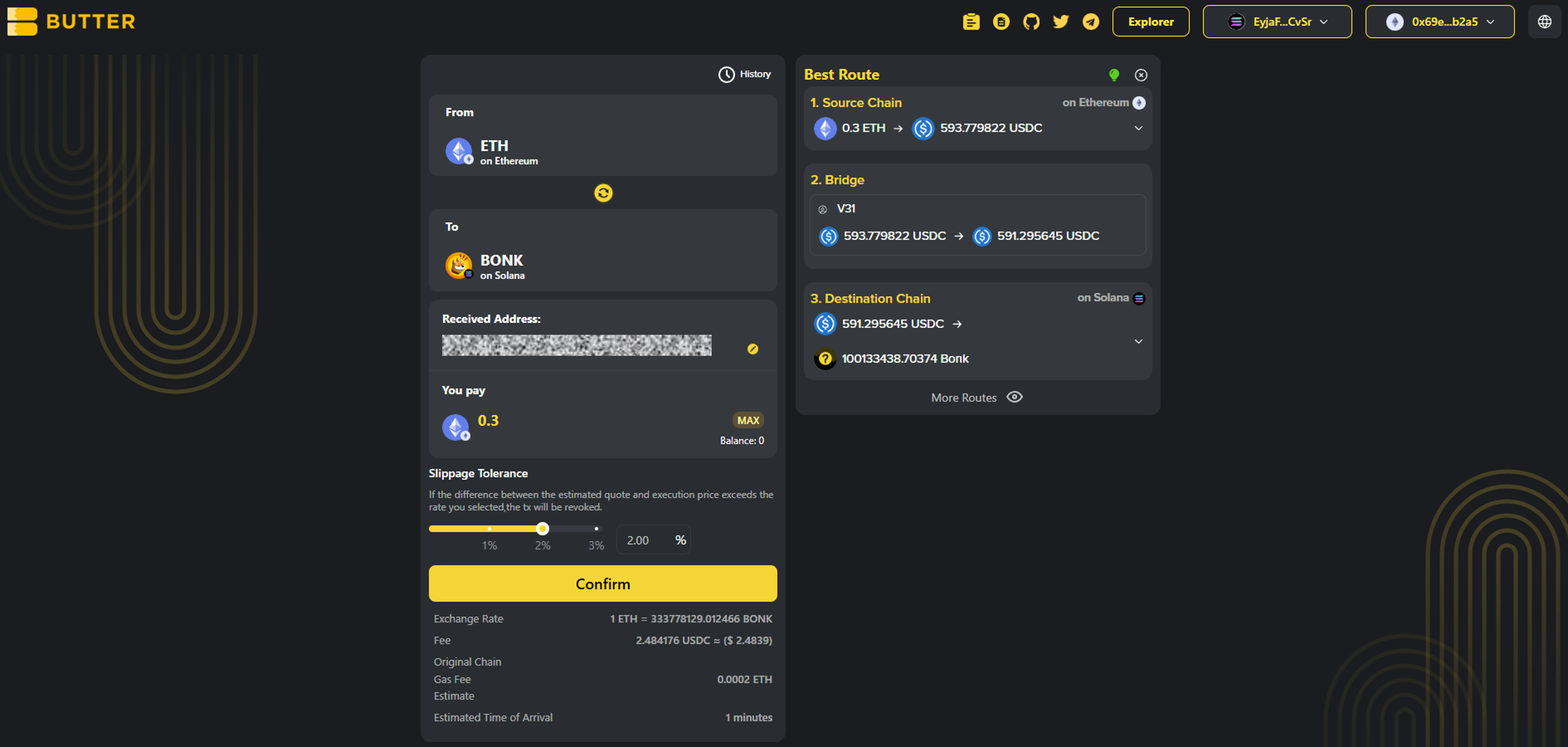 *Example route: Source Chain swap to USDC, bridge, then swap to BONK on Solana*
### Step 6) Confirm and complete the flow
Click Confirm to open the swap summary popup. Before signing, verify:
* Destination chain is correct (Solana, BNB Chain, or TRON)
* Destination token is correct (the memecoin you selected)
* Received Address matches the destination chain format
* Estimated receive looks reasonable for the amount
After submitting, you can monitor progress via:
* History in the swap UI (if shown)
* [ButterSwap Explorer](https://explorer.butterswap.io/en) (if linked from the swap details screen)
*Example route: Source Chain swap to USDC, bridge, then swap to BONK on Solana*
### Step 6) Confirm and complete the flow
Click Confirm to open the swap summary popup. Before signing, verify:
* Destination chain is correct (Solana, BNB Chain, or TRON)
* Destination token is correct (the memecoin you selected)
* Received Address matches the destination chain format
* Estimated receive looks reasonable for the amount
After submitting, you can monitor progress via:
* History in the swap UI (if shown)
* [ButterSwap Explorer](https://explorer.butterswap.io/en) (if linked from the swap details screen)
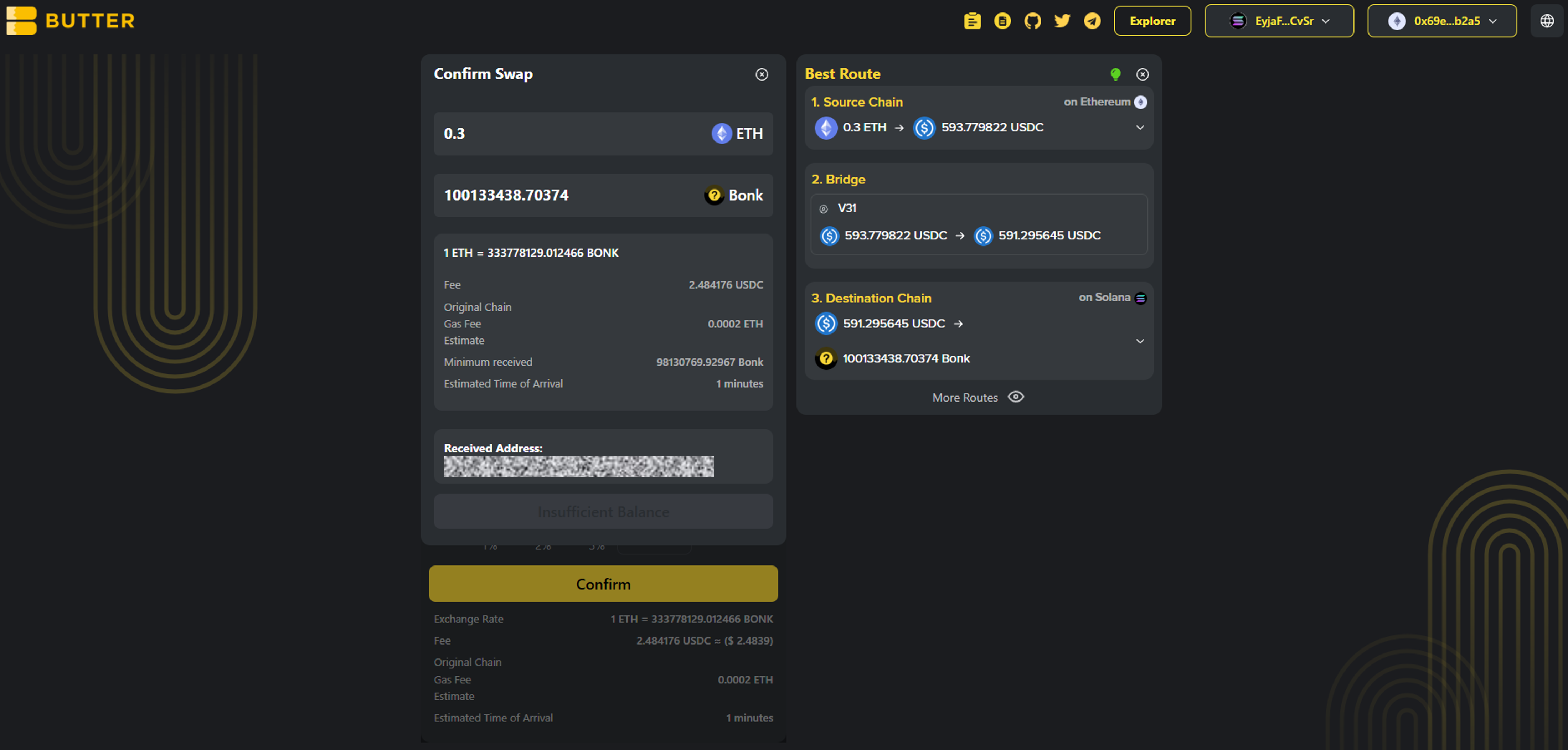 *Confirm popup showing To chain, To token, and Received Address*
***
## Fees and timing
* ### What fees apply?
Fees depend on route and network conditions. You will see estimated fees and timing in Best Route or the confirm summary before you proceed.
* ### Do I need gas on the destination chain?
Receiving usually does not require gas, but you will need gas later to move the memecoin:
* Solana: SOL
* BNB Chain: BNB
* TRON: TRX
* ### How long does it take?
Timing varies based on the From chain confirmation speed and routing execution. Use History and the explorer link from swap details if available.
***
## Common issues (quick fixes)
* ### I pasted the wrong receiving address format
Solana is not `0x...` and not `T...`. TRON is `T...`. BNB Chain is `0x...`. Fix the address and retry.
* ### The token name looks right but the network is wrong
Memecoin tickers are often reused. Confirm the To network label shows Solana, BNB Chain, or TRON as intended.
* ### Confirm is disabled or the popup does not appear
Most common causes:
1. From wallet not connected
2. Received Address not set
3. Not enough gas on the From chain
4. Amount too small for the route or fees shown
* ### I do not see the memecoin in the token list
It may not be supported by the available route or token list. Only use contract addresses from official sources.
* ### I received the memecoin but cannot transfer it later
You likely need destination gas:
* Solana needs SOL
* BNB Chain needs BNB
* TRON needs TRX
***
## FAQ
*Confirm popup showing To chain, To token, and Received Address*
***
## Fees and timing
* ### What fees apply?
Fees depend on route and network conditions. You will see estimated fees and timing in Best Route or the confirm summary before you proceed.
* ### Do I need gas on the destination chain?
Receiving usually does not require gas, but you will need gas later to move the memecoin:
* Solana: SOL
* BNB Chain: BNB
* TRON: TRX
* ### How long does it take?
Timing varies based on the From chain confirmation speed and routing execution. Use History and the explorer link from swap details if available.
***
## Common issues (quick fixes)
* ### I pasted the wrong receiving address format
Solana is not `0x...` and not `T...`. TRON is `T...`. BNB Chain is `0x...`. Fix the address and retry.
* ### The token name looks right but the network is wrong
Memecoin tickers are often reused. Confirm the To network label shows Solana, BNB Chain, or TRON as intended.
* ### Confirm is disabled or the popup does not appear
Most common causes:
1. From wallet not connected
2. Received Address not set
3. Not enough gas on the From chain
4. Amount too small for the route or fees shown
* ### I do not see the memecoin in the token list
It may not be supported by the available route or token list. Only use contract addresses from official sources.
* ### I received the memecoin but cannot transfer it later
You likely need destination gas:
* Solana needs SOL
* BNB Chain needs BNB
* TRON needs TRX
***
## FAQ
How do I swap into Solana memecoins without a CEX account?
**Answer:** Open the [dApp](https://www.butterswap.io/en/swap), connect your From wallet, set To chain as Solana, select the memecoin (for example BONK), set a Solana receiving address (base58), then Confirm and sign.
How do I swap into BNB Chain memecoins without Binance?
Set To chain as BNB Chain, choose the memecoin, and use an EVM receiving address starting with 0x.
How do I swap into TRON memecoins with USDT TRC20?
Set To chain as TRON, choose the memecoin, and use a TRON receiving address starting with T. You may need TRX later to move tokens on TRON.
Why does the route show USDC steps before the memecoin?
Some routes convert your From token into a liquid bridge asset (often USDC) before crossing chains, then swap into the memecoin on the destination chain. Verify destination chain, destination token, and receiving address before confirming.
What slippage should I use for memecoin swaps?
Start at 2.00% like the screenshot, then adjust only if needed. Thin liquidity or fast-moving memecoins may require higher slippage.
Do I need SOL, BNB, or TRX to receive a memecoin?
Usually no for receiving, but you will need SOL, BNB, or TRX later to transfer or swap the memecoin on the destination chain.
***
## Start swapping into memecoins
Open the [dApp](https://www.butterswap.io/en/swap) and set:
* From: your source chain and asset
* To: Solana, BNB Chain, or TRON memecoin
* Received Address: correct format for the destination chain
***
## Related guides
* [🧈 What is a cross-chain swap?](/butter-swap-user-guide/what-is-a-cross-chain-swap.md)
* [USDT (TRC20) to BTC (Native Bitcoin) Step by Step](/butter-swap-user-guide/swap-tutorials/swap-usdt-trc20-to-btc.md)
* [BTC (Native Bitcoin) to USDT on BNB Chain Step by Step](/butter-swap-user-guide/swap-tutorials/swap-btc-to-usdt-bnb-chain.md)
* [BTC (Native Bitcoin) to USDT (TRC20) on TRON Step by Step](/butter-swap-user-guide/swap-tutorials/swap-btc-to-usdt-trc20-tron.md)
* [ETH (Ethereum) to USDT (TRC20) on TRON Step by Step](/butter-swap-user-guide/swap-tutorials/swap-eth-to-usdt-trc20-tron.md)
* [BTC (Native Bitcoin) to USDC on Solana Step by Step](/butter-swap-user-guide/swap-tutorials/swap-btc-to-usdc-solana.md)