> For the complete documentation index, see [llms.txt](https://docs.butternetwork.io/llms.txt). Markdown versions of documentation pages are available by appending `.md` to page URLs; this page is available as [Markdown](https://docs.butternetwork.io/butter-swap-user-guide/swap-tutorials/swap-usdt-trc20-to-btc.md).
# USDT (TRC20) to BTC (Native Bitcoin)
This guide shows how to swap USDT on TRON (TRC20) into native BTC on the Bitcoin network using ButterSwap’s cross-chain swap flow (no centralized exchange account required).
## Pre-filled USDT to BTC swap link
[Pre-filled USDT to BTC swap link](https://www.butterswap.io/en/swap?from=728126428%3AUSDT\&to=1360095883558913%3ABTC)
**Important:** If you are receiving native BTC on Bitcoin, your **Received Address must be a Bitcoin address** (e.g., `bc1...`, `1...`, `3...`).\
Do **not** paste a TRON address (often starts with `T...`) or an EVM address (`0x...`).
Need the opposite direction? See: **BTC (Native Bitcoin) → TRON (TRX / USDT-TRC20): Step-by-Step (No CEX Account)** (link once published).
***
## Quick checklist (30 seconds)
Before you start, make sure you have:
✅ USDT (TRC20) on TRON\
✅ A small amount of TRX (TRON network fees)\
✅ A Bitcoin receiving address (`bc1...`, `1...`, `3...`)\
✅ A supported wallet connection (WalletConnect works if your wallet isn’t listed)
***
## What you’ll get (in one sentence)
You’ll send **USDT (TRC20) on TRON** and receive **native BTC on Bitcoin mainnet** to a **Bitcoin address**.
***
## Before you start
### Address format check (BTC receiving)
✅ Valid BTC formats: `bc1...`, `1...`, `3...`\
❌ Do not use: `T...` (TRON), `0x...` (EVM)
### Gas / fees (TRON)
TRON transaction fees are paid in **TRX** (bandwidth/energy). Keep a small amount of TRX available.
For generic wallet connection help: [Click Here](/butter-swap-user-guide/user-guide.md)
***
## Step-by-step: USDT (TRC20) → BTC (native)
### Step 1) Open ButterSwap
Go to the pre-filled swap page (recommended) or go to the app:
* **Prefilled:** [Pre-filled USDT → BTC swap link](https://www.butterswap.io/en/swap?from=728126428%3AUSDT\&to=1360095883558913%3ABTC)
* **dApp:** [dApp](https://www.butterswap.io/en/swap)
Set:
* **From:** USDT on TRON (TRC20)
* **To:** BTC on Bitcoin (native BTC)
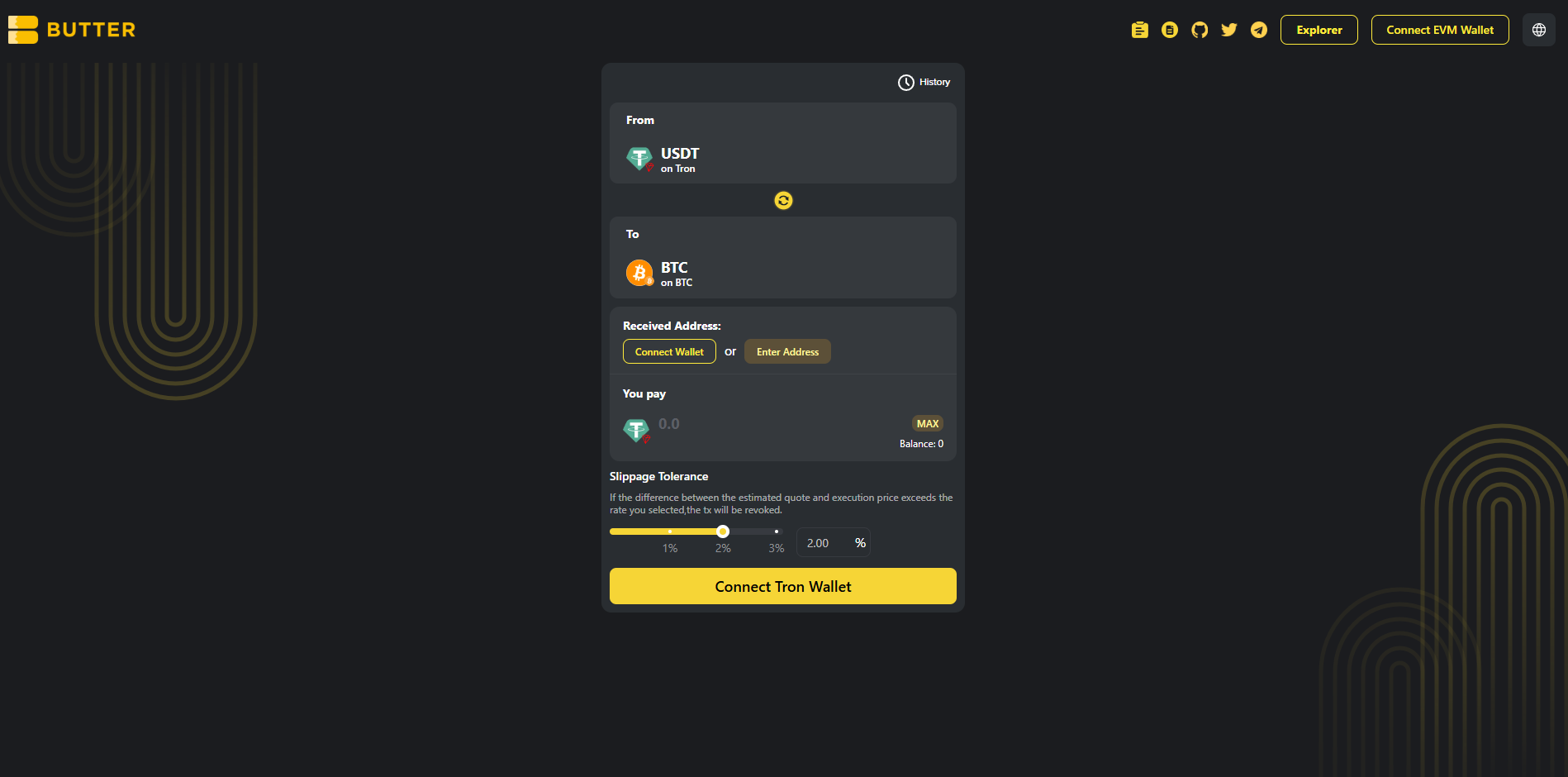 *From=USDT (TRON) and To=BTC (Bitcoin)*
### Step 2) Connect your TRON wallet (From)
Click **Connect Tron Wallet** (the big button on the swap card) and connect the wallet that holds your USDT (TRC20).
> If you connected the wrong wallet type and your TRON USDT balance shows as 0, switch to a wallet that supports TRON assets (TRC20).\
> Note: The wallet button in the top-right is not the same as setting your BTC receiving address. You’ll set the BTC destination in **Received Address** next.
*From=USDT (TRON) and To=BTC (Bitcoin)*
### Step 2) Connect your TRON wallet (From)
Click **Connect Tron Wallet** (the big button on the swap card) and connect the wallet that holds your USDT (TRC20).
> If you connected the wrong wallet type and your TRON USDT balance shows as 0, switch to a wallet that supports TRON assets (TRC20).\
> Note: The wallet button in the top-right is not the same as setting your BTC receiving address. You’ll set the BTC destination in **Received Address** next.
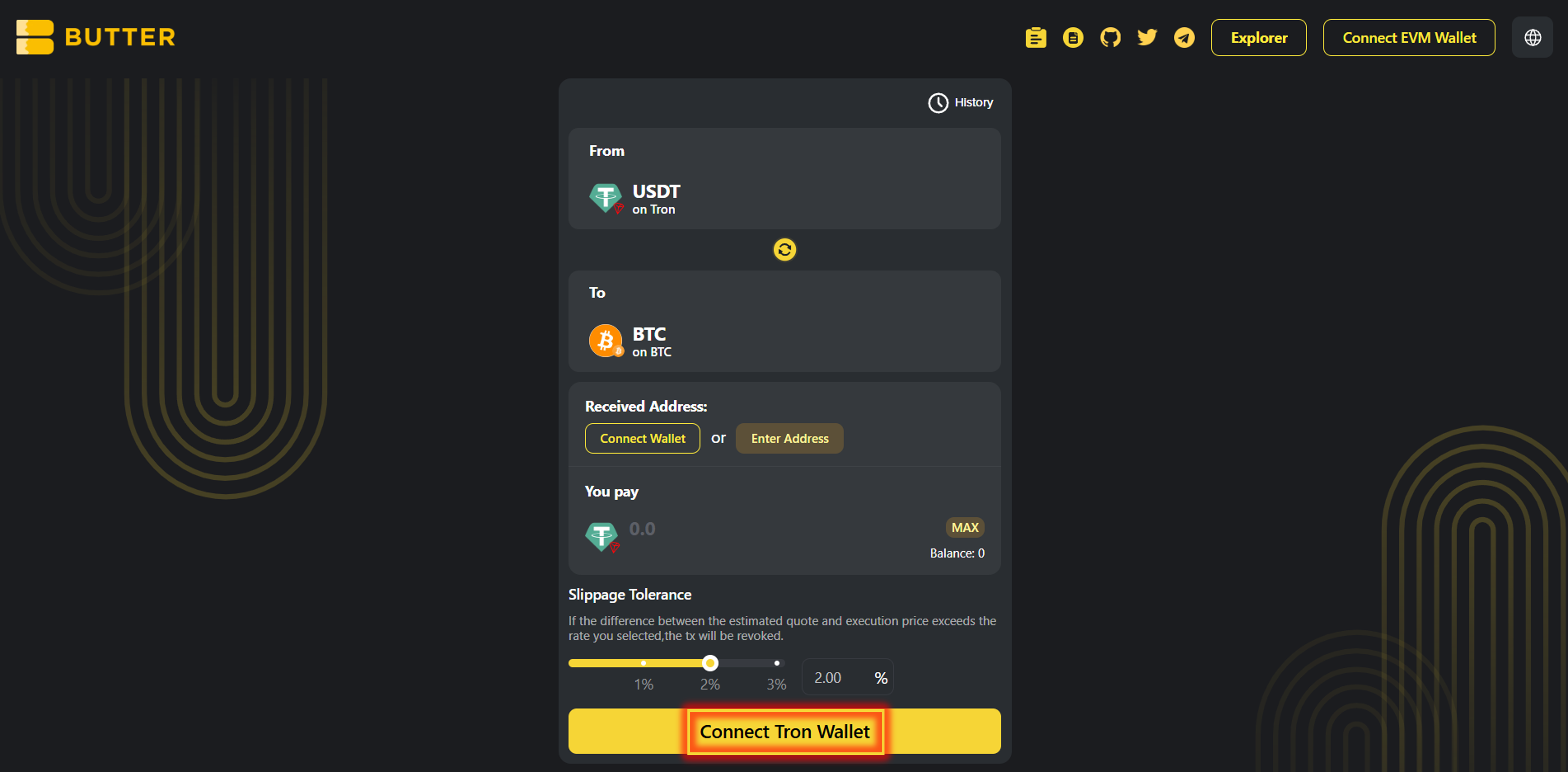 *Connect Tron Wallet*
### Step 3) Set your BTC receiving address on Bitcoin mainnet (two valid paths)
In **Received Address**, you’ll see two options:
**Option A — Connect wallet (same-wallet flow):**\
Click **Connect Wallet** under Received Address to connect to the same wallet holding your TRON USDT. (If it doesn’t provide a Bitcoin address, use Option B.)
**Option B — Enter a BTC address (send to another wallet):**\
Click **Enter Address** and paste your Bitcoin address.
✅ Valid BTC formats: `bc1...`, `1...`, `3...`\
❌ Do not use: `T...` (TRON), `0x...` (EVM)
*Connect Tron Wallet*
### Step 3) Set your BTC receiving address on Bitcoin mainnet (two valid paths)
In **Received Address**, you’ll see two options:
**Option A — Connect wallet (same-wallet flow):**\
Click **Connect Wallet** under Received Address to connect to the same wallet holding your TRON USDT. (If it doesn’t provide a Bitcoin address, use Option B.)
**Option B — Enter a BTC address (send to another wallet):**\
Click **Enter Address** and paste your Bitcoin address.
✅ Valid BTC formats: `bc1...`, `1...`, `3...`\
❌ Do not use: `T...` (TRON), `0x...` (EVM)
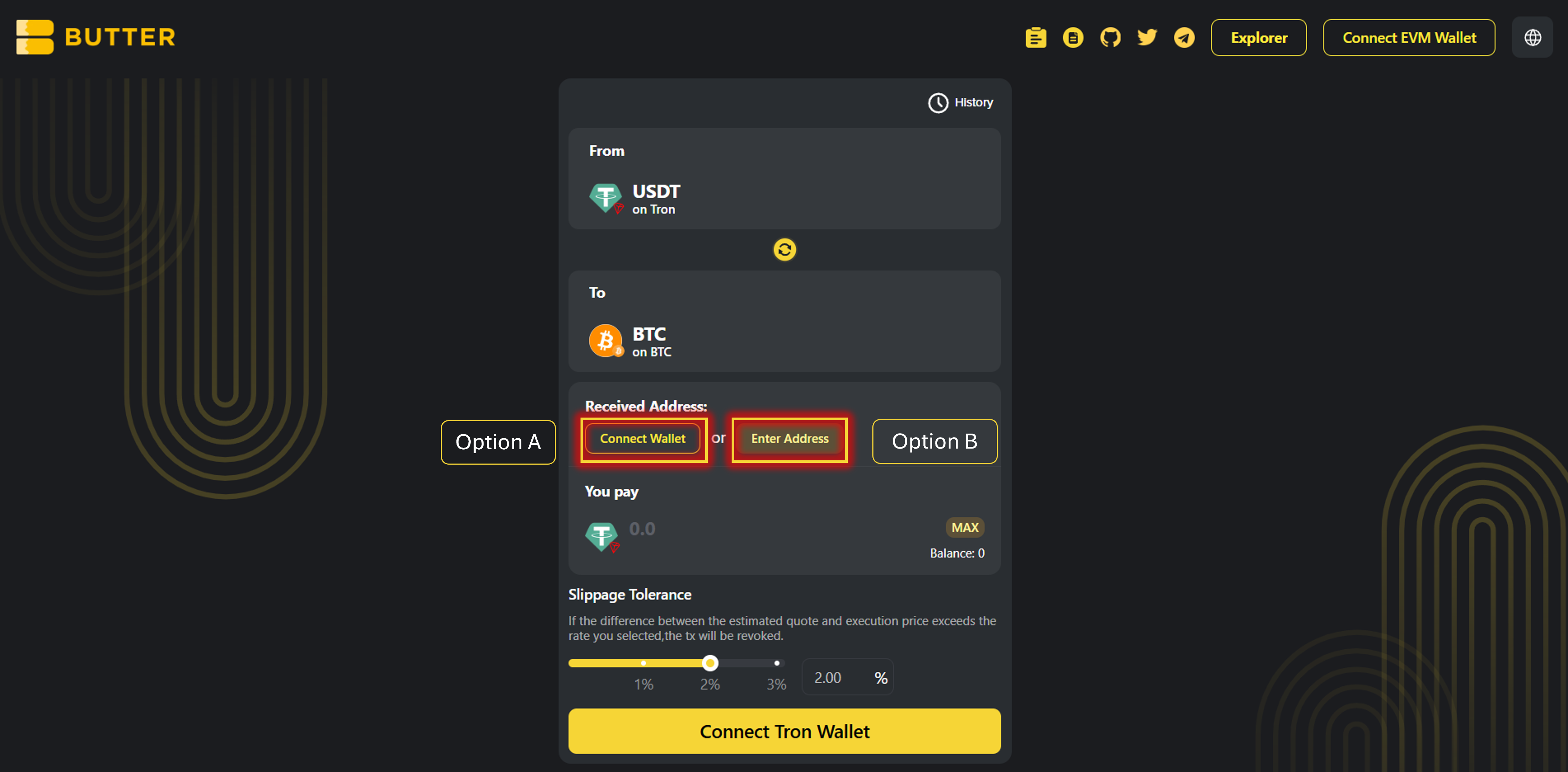 *Received Address options (Connect Wallet / Enter Address)*
### Step 4) Enter amount and review route + fees
* Enter the amount of USDT you want to swap
* Review the **Best Route** panel on the right (route steps + estimated receive)
* Check the fee/ETA area (example fields you may see):
* Fee
* Original chain gas fee estimate (TRON fees paid in TRX — bandwidth/energy)
* Estimated time of arrival
*Received Address options (Connect Wallet / Enter Address)*
### Step 4) Enter amount and review route + fees
* Enter the amount of USDT you want to swap
* Review the **Best Route** panel on the right (route steps + estimated receive)
* Check the fee/ETA area (example fields you may see):
* Fee
* Original chain gas fee estimate (TRON fees paid in TRX — bandwidth/energy)
* Estimated time of arrival
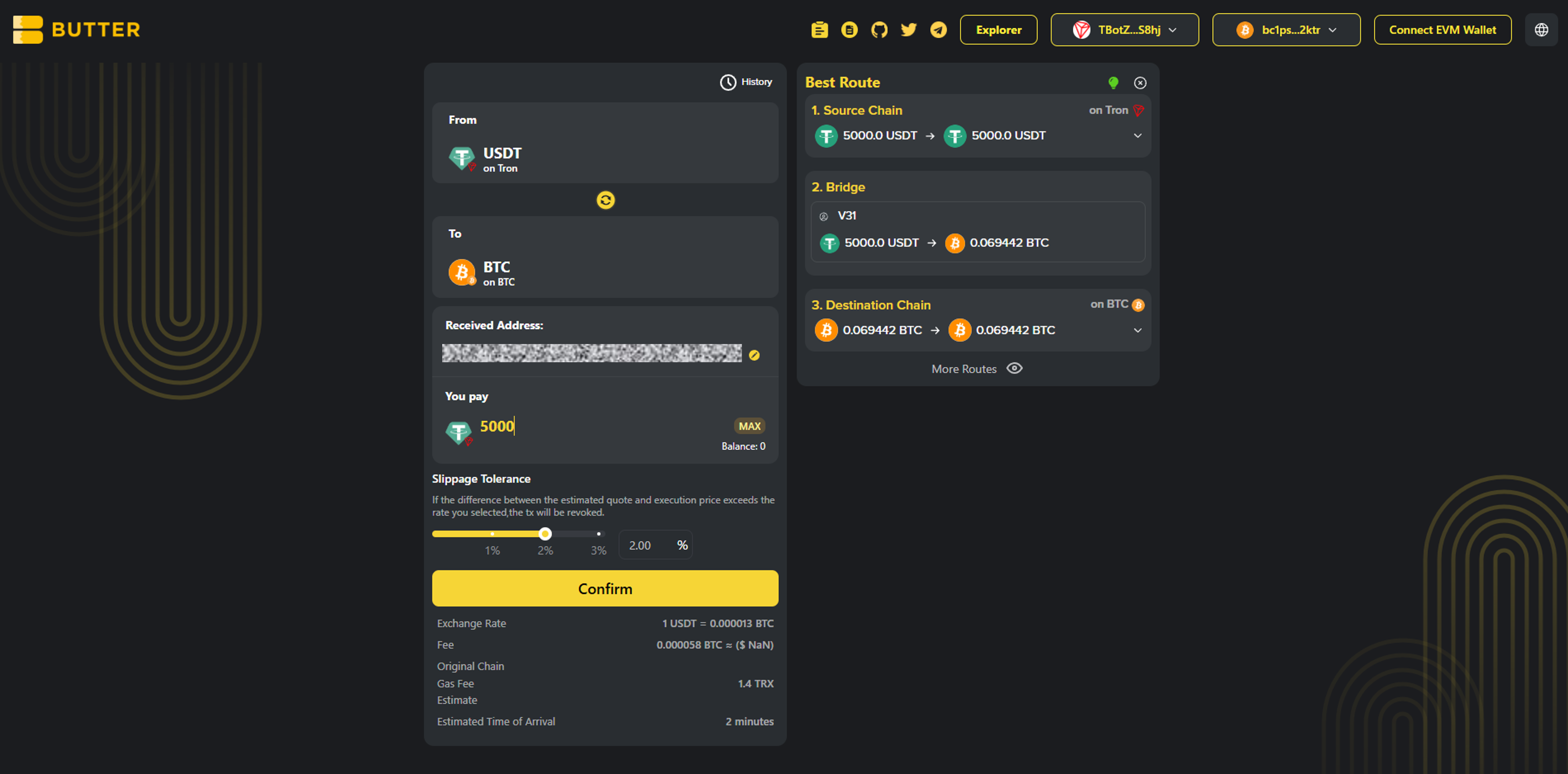 *Best Route + fee/ETA area*
### Step 5) Click Confirm (popup) and sign in your wallet
Click **Confirm**. A popup will show the swap summary. Confirm, then follow your wallet prompts:
* If prompted, **approve USDT** (first time only)
* Final transaction confirmation signature(s)
After submitting, you can monitor progress via:
* History in the swap UI
* [ButterSwap Explorer](https://explorer.butterswap.io/en)
*Best Route + fee/ETA area*
### Step 5) Click Confirm (popup) and sign in your wallet
Click **Confirm**. A popup will show the swap summary. Confirm, then follow your wallet prompts:
* If prompted, **approve USDT** (first time only)
* Final transaction confirmation signature(s)
After submitting, you can monitor progress via:
* History in the swap UI
* [ButterSwap Explorer](https://explorer.butterswap.io/en)
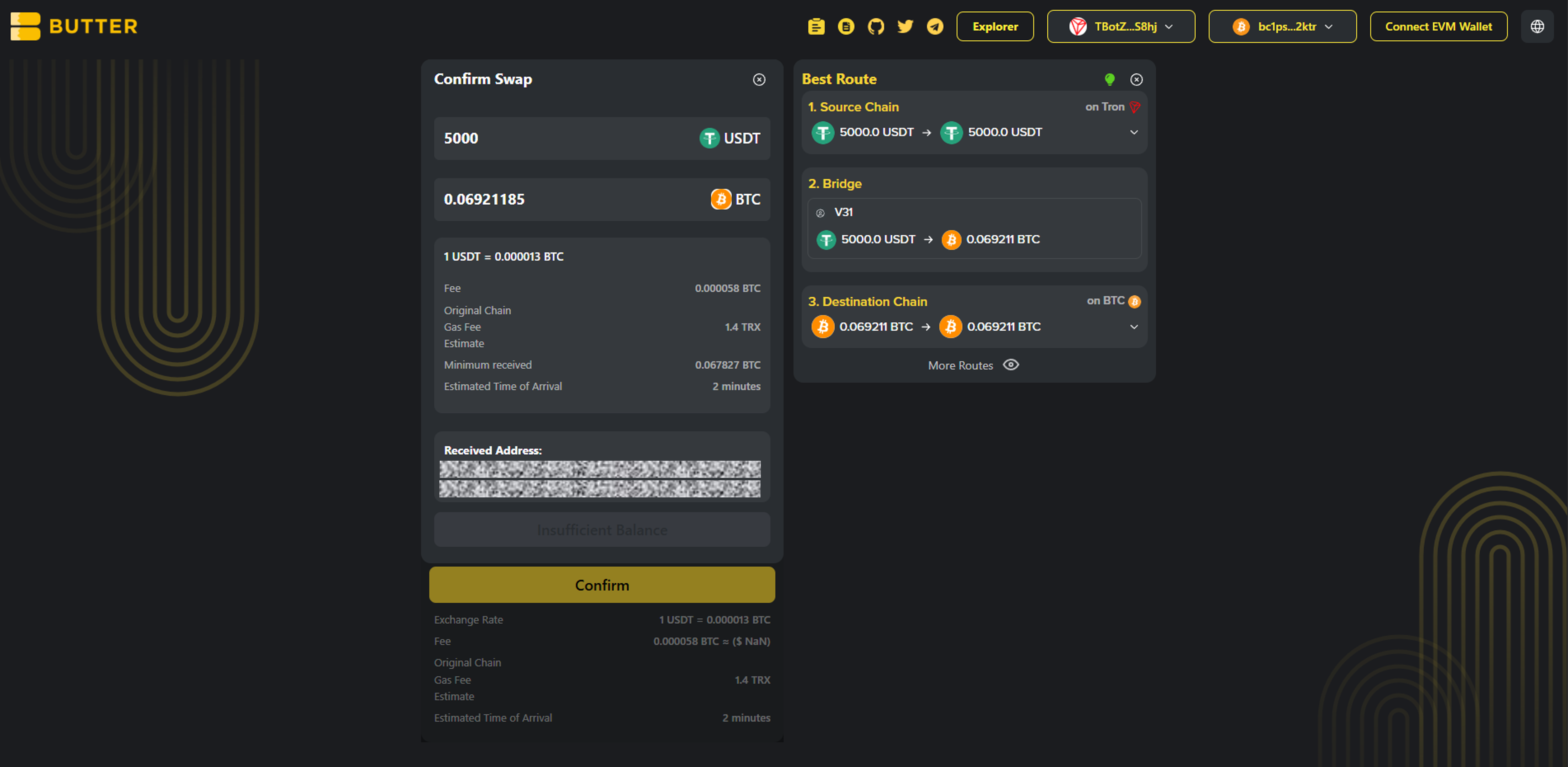 *Confirm swap popup*
***
## Fees & timing (USDT TRC20 → BTC)
* ### Do I need TRX?
Yes. On TRON, transaction fees are paid in TRX (bandwidth/energy). Keep a small amount of TRX available.
* ### What BTC do I receive?
Native BTC on Bitcoin mainnet (not wrapped BTC like WBTC/BTCB).
* ### How long does it take?
Timing varies based on network conditions and routing/liquidity. Track progress in History and verify via [ButterSwap Explorer](https://explorer.butterswap.io/en).
***
## Common issues (quick fixes)
* ### Wrong receiving address format (most common)
Your Received Address must be a Bitcoin address: `bc1…`, `1…`, or `3…`.\
Don’t use `T…` (TRON) or `0x…` (EVM).
* ### Not enough TRX for fees (bandwidth/energy)
If you can’t proceed or the wallet errors, top up a small amount of TRX and retry.
* ### Expecting “BTC on TRON” instead of BTC on Bitcoin
This guide swaps TRON USDT (TRC20) → BTC on Bitcoin mainnet, not “BTC” on another chain.
* ### Confusing wallet connect vs Received Address
Connecting a wallet ≠ setting a BTC destination address. Always double-check the **Received Address** field before confirming.
***
## FAQ
*Confirm swap popup*
***
## Fees & timing (USDT TRC20 → BTC)
* ### Do I need TRX?
Yes. On TRON, transaction fees are paid in TRX (bandwidth/energy). Keep a small amount of TRX available.
* ### What BTC do I receive?
Native BTC on Bitcoin mainnet (not wrapped BTC like WBTC/BTCB).
* ### How long does it take?
Timing varies based on network conditions and routing/liquidity. Track progress in History and verify via [ButterSwap Explorer](https://explorer.butterswap.io/en).
***
## Common issues (quick fixes)
* ### Wrong receiving address format (most common)
Your Received Address must be a Bitcoin address: `bc1…`, `1…`, or `3…`.\
Don’t use `T…` (TRON) or `0x…` (EVM).
* ### Not enough TRX for fees (bandwidth/energy)
If you can’t proceed or the wallet errors, top up a small amount of TRX and retry.
* ### Expecting “BTC on TRON” instead of BTC on Bitcoin
This guide swaps TRON USDT (TRC20) → BTC on Bitcoin mainnet, not “BTC” on another chain.
* ### Confusing wallet connect vs Received Address
Connecting a wallet ≠ setting a BTC destination address. Always double-check the **Received Address** field before confirming.
***
## FAQ
Can I swap USDT (TRC20) to BTC without using a centralized exchange?
Yes. This is a wallet based cross-chain swap flow on ButterSwap, no CEX account required.
Can I send USDT (TRC20) directly to a Bitcoin address?
No. TRON and Bitcoin are different networks. You need a cross-chain swap route to receive native BTC.
Do I need TRX to swap USDT on TRON (TRC20)?
Usually yes. TRON fees are paid in TRX (bandwidth or energy).
What Bitcoin address format should I use to receive BTC?
Use a Bitcoin mainnet address like bc1, 1, or 3 format addresses (for example `bc1...`, `1...`, `3...`).
Is convert USDT TRC20 to Bitcoin the same as swap USDT TRC20 to BTC?
Most users mean the same thing. They want to convert TRON USDT into native BTC on Bitcoin mainnet.
***
## Start your USDT to BTC swap
Open the pre-filled page:
* [USDT to BTC](https://www.butterswap.io/en/swap?from=728126428%3AUSDT\&to=1360095883558913%3ABTC)
Or open the [dApp](https://www.butterswap.io/en/swap) and set:
* From: USDT (TRC20) on TRON
* To: BTC (Native Bitcoin) on Bitcoin mainnet
***
## Related guides
* [BTC (Native Bitcoin) to USDT on BNB Chain Step-by-Step (No CEX Account)](/butter-swap-user-guide/swap-tutorials/swap-btc-to-usdt-bnb-chain.md)